
THE AUTHOR:

Student portal development needs to account for how students access university services throughout the day. Checking a timetable on a phone, uploading a document over an unstable connection, and returning to an unfinished request should all be considered during design.
Jisc’s 2024/25 survey of 15,398 students across 30 UK higher education providers found that 60% of respondents experienced Wi-Fi connectivity issues on or off campus, while 37% lacked access to a suitable device at some point during their studies. These findings support prioritizing device compatibility, reliable form submission, and recovery after a connection drops. Student ratings of digital learning have improved over recent years, although barriers to reliable access remain.
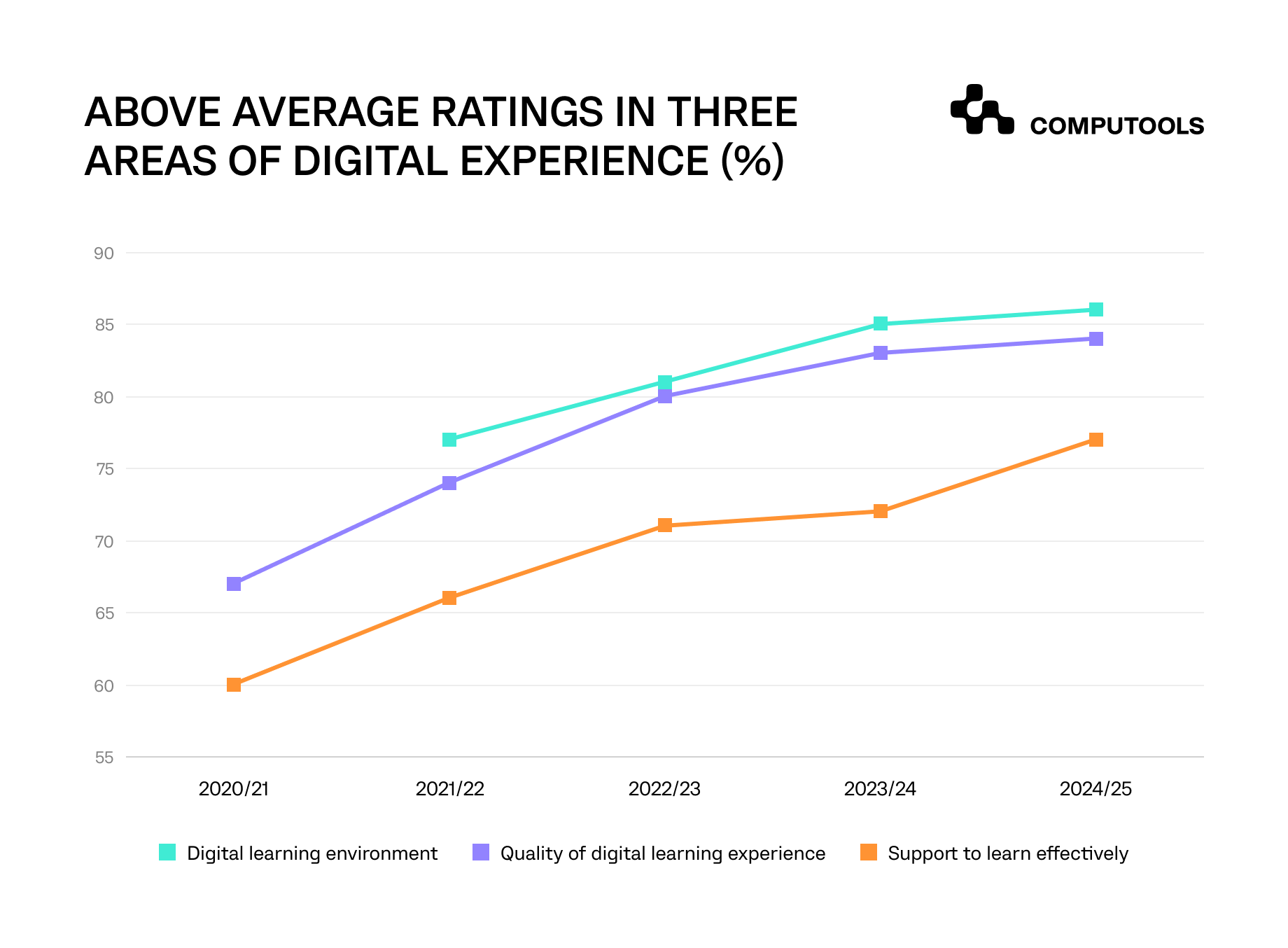
Student ratings of digital learning environments, learning experience, and technology support, 2020/21–2024/25.
The systems behind these services also affect their reliability. In EDUCAUSE’s 2025 Data Modernization and Management QuickPoll, which received 165 complete responses, 51% of respondents reported departmental data silos as a barrier to advancing institutional data strategy, while 33% cited difficulties with data governance and compliance. For portal teams, these findings reinforce the need to define which system maintains each record, who can view or change it, and how updates reach the student-facing interface.
Students also need to understand what requires their attention and whether an action has been completed. A submitted request should have a visible status; a registration attempt should return a confirmed outcome or explain what prevents completion. Delivering this experience requires coordinated decisions about interface design, university processes, and the systems behind each service.
How we unified campus services through student portal development
Following the Uni-Campus rollout at a UK-based university group serving more than 25,500 students across three campuses, student portal satisfaction increased from 3.2/5 to 4.1/5. Routine requests requiring manual intervention fell from 65% to 25% of total ticket volume. These outcomes followed a wider program connecting institutional systems and student-service workflows.
Through our education software development services, we delivered Uni-Campus, giving students one entry point for timetables, tuition information, academic requests, and campus services, alongside controlled staff access to requests and records.
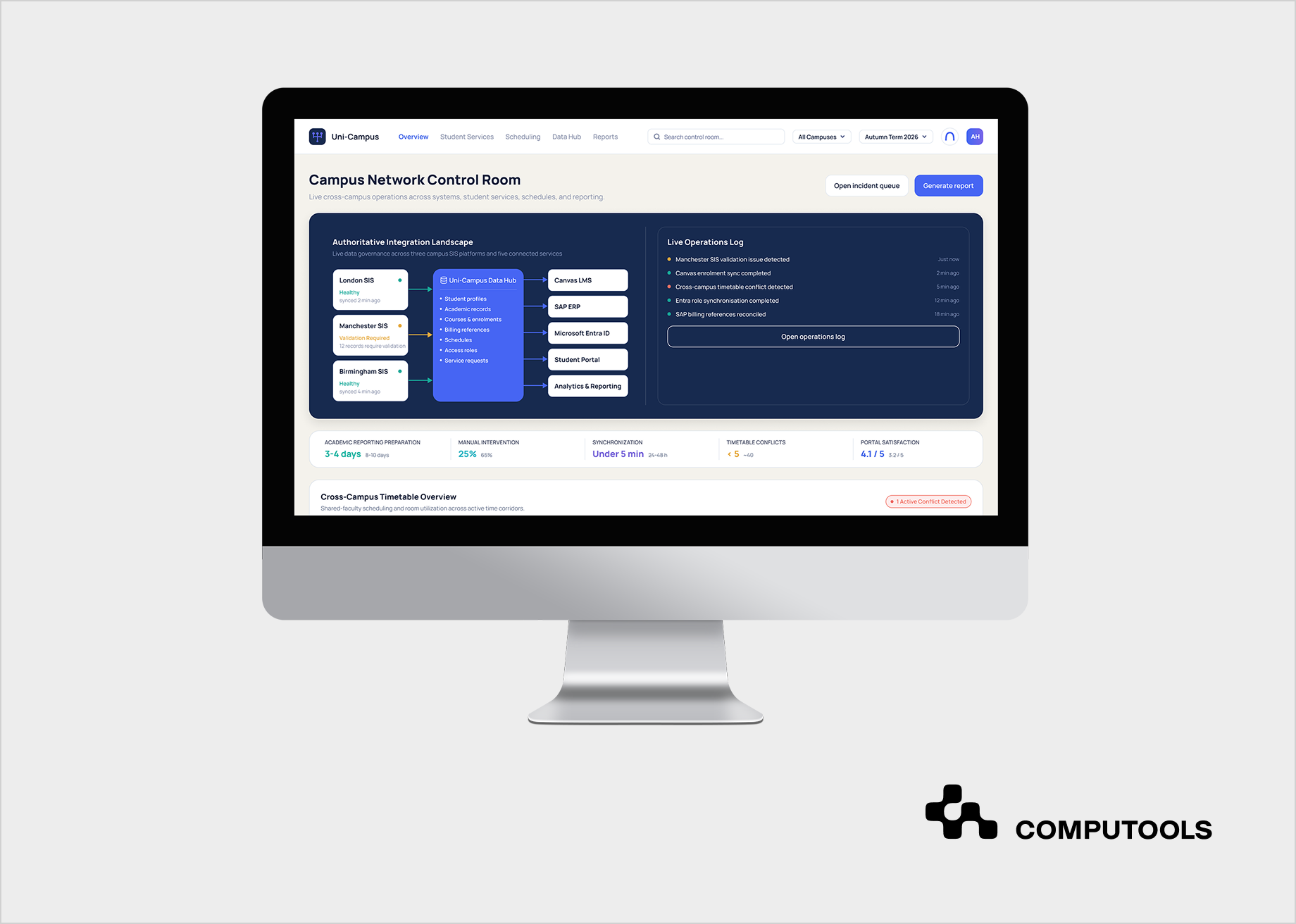
We defined a shared data model for student profiles, course references, billing information, schedules, and access roles across campuses. API services connected three legacy SIS environments with Canvas LMS, SAP ERP, and Microsoft Entra ID, preserving existing systems as the authoritative sources for their records.
Our team designed student dashboards and service-request workflows around core academic services. Role-based permissions controlled access, and audit trails recorded relevant actions. Delivery followed the academic calendar to limit disruption during registration, examinations, and service peaks.
How to build a unified student portal in 8 steps
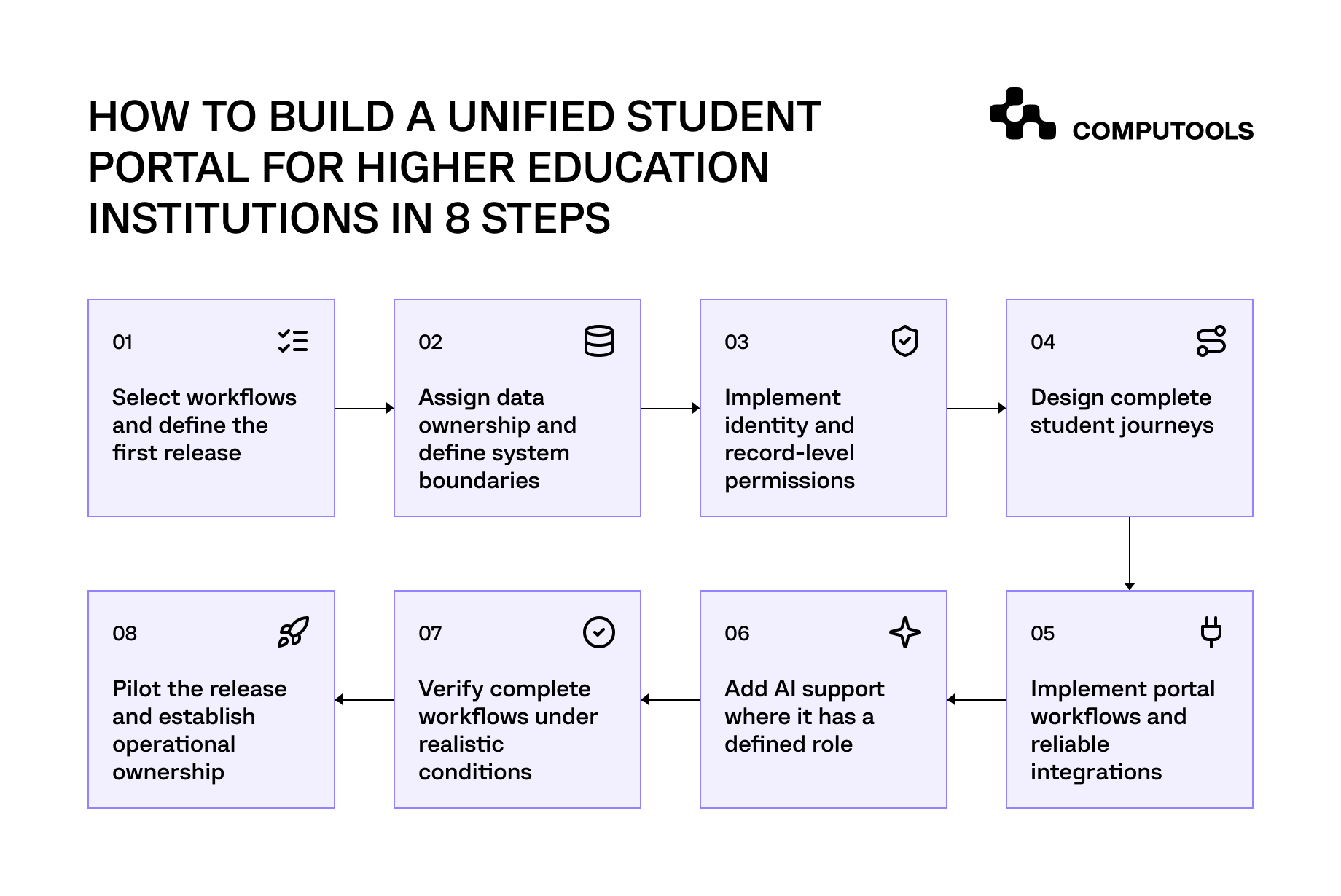
The following steps explain how to build a student portal, covering service scope, software architecture, implementation, validation, and ongoing operation.
Step 1. Select workflows and define the first release
Define the first release as a set of complete student services, each with an agreed operating process. Begin with evidence from service-desk tickets, existing portal analytics, student interviews, and walkthroughs with academic administration, finance, and student services. Identify which tasks generate repeated contact, where students abandon a process, and which questions staff repeatedly answer.
Classify support demand by its underlying cause. A student asking about a document may be unable to find the application, understand the evidence requirements, or check whether a submitted request is progressing. These problems require different changes: navigation improvements, clearer instructions, or access to request status. Separate them before estimating development effort. The University of Arizona used student research and journey mapping to identify gaps across academic, administrative, and student-life activities.
For a higher education student portal, examine how each service varies across campuses, programs, and student groups. Confirm whether the same request follows different eligibility rules, evidence requirements, approval routes, or deadlines. Involve the staff responsible for these variations when deciding which workflows can share a process and which need distinct handling.
Document each candidate workflow with enough detail to establish its boundaries:
| Requirement | What to establish |
| Trigger and eligible users | Why the student starts the task and who can use the service. |
| Required information | What the student must provide and what the institution already holds. |
| Decisions and approvals | Which rules determine eligibility and where staff judgment is required. |
| Exceptions | How missing evidence, disputed information, withdrawals, and rejected requests are handled. |
| Completion | What confirms that the service has been delivered and what the student receives. |
| Operational responsibility | Who owns the service, handles escalations, and approves process changes. |
Prioritize workflows using demand, consequences of failure, technical dependencies, and operational readiness. High request volume can justify automation, but unresolved policy differences or unavailable vendor interfaces can delay delivery. Include dependency work in estimates and confirm that service teams can support the proposed process.
Keep the selected scope complete enough for students to finish the task. For a document request, this could include checking eligibility, submitting evidence, receiving confirmation, tracking progress, and accessing the issued document. Staff may continue reviewing exceptions through an existing back-office process, provided responsibilities and student-facing statuses are defined.
Establish baseline measures before changing the workflow. Define what counts as a started task, successful completion, abandonment, and staff intervention. Separate requests that require staff judgment from contacts caused by unclear instructions or missing status information.
Capture the agreed scope in the EdTech software development brief. Include workflow boundaries, policy decisions, dependencies, acceptance criteria, and explicit exclusions. Assign unresolved questions to named owners before committing the affected services to a release.
Step 2. Assign data ownership and define system boundaries
A unified student portal needs a defined source for every record it displays and every operation it initiates. Assign authority at the data-domain level: student identity, enrollment, course registration, learning activity, billing, scheduling, and service requests. Name the institutional team responsible for each domain, including who approves corrections and resolves discrepancies.
Inventory the systems supporting the workflows selected for the first release. Document campus-specific configurations, vendor interfaces, access restrictions, maintenance windows, and contractual limitations. Confirm which records the portal can retrieve, which operations existing platforms support, and where an additional application service is required.
Preserve distinctions between related entities. A person can have several program enrollments; a course can have several scheduled sections; a payment can be initiated before it appears in the financial ledger. Model these relationships explicitly so the portal can present the correct context for each task.
Establish cross-system identifiers and matching rules. Include a review process for duplicate profiles, changed identifiers, and ambiguous matches. Preserve the relationship between original records and any consolidated profile so staff can trace discrepancies to their source.
Define academic data management rules for conflicting values, effective dates, corrections, and retention. Document acceptable data age by use case. Timetable browsing may tolerate a defined refresh interval, while a registration decision requires current eligibility and capacity information. Record how the portal should indicate stale or unavailable information; implement refresh and recovery mechanisms in Step 5.
Use these decisions to establish architectural boundaries. Specify what remains in source systems, what the portal stores for its own workflows, and which shared services assemble information for display. Assign ownership and retention rules to cached copies, request histories, and audit records.
For Uni-Campus, we mapped authoritative systems across campuses and normalized student, course, billing, scheduling, and access data before expanding portal functionality. The shared data model supported portal workflows while the existing institutional platforms retained responsibility for their records.
When portal data is also used for institutional analytics, data quality, ownership, and privacy require additional consideration. Our article on the role of Big Data in education examines these issues and their implications for educational decision-making
Step 3. Implement identity and record-level permissions
Connect the portal to the institution’s identity provider and map authenticated accounts to the institutional identifiers established in Step 2. Document how identity attributes reach the application, which attributes support access decisions, and who maintains them. Require stronger authentication for privileged administration and sensitive account changes, with a defined account-recovery process.
Build access changes around the user’s relationship with the institution. Enrollment, leave, graduation, employment changes, and temporary appointments can affect permissions differently. For example, a graduate may retain access to documents while losing course-registration privileges. Specify the event that changes each entitlement, its effective date, and the team responsible for resolving failed updates.
For a student self-service platform, define permissions by combining role, action, and record scope. A student can retrieve their own documents; an adviser can review assigned students; a finance employee can manage permitted billing records. Add campus, program, or assignment restrictions where institutional policy requires them. Deny access when the application cannot establish the required permission.
Handle users with several roles explicitly. A postgraduate student who also teaches may need separate contexts for personal records and teaching responsibilities. Define which permissions apply to each operation and how the application prevents access to restricted records through overlapping roles.
Enforce authorization in backend services for every relevant request, including searches, exports, attachments, and document downloads. Validate the requested action against the specific record. A user who can open one request must not gain access to another by changing its identifier. OWASP documents this failure as broken object-level authorization.
Define session expiration, reauthentication, and revocation behavior, including how quickly account suspensions and privilege removals must take effect. Verify these behaviors across the identity provider and portal.
Give integrations separate service identities with narrowly scoped permissions. Assign an owner to each identity, protect its credentials, and establish rotation and revocation procedures. Preserve the initiating user’s identity in audit records when a service performs an action on their behalf.
Record permission grants, privileged actions, and authorization failures with sufficient context for investigation. Restrict access to these logs and exclude credentials and unnecessary personal information. Have institutional owners approve the permission model, then translate its allowed and denied scenarios into automated authorization tests.
Step 4. Design complete student journeys
Translate the workflows selected in Step 1 into navigation, screen sequences, and interface states. Begin with an information architecture that reflects student tasks: finding a class, checking a charge, requesting a document, or resolving a registration restriction. Use language students recognize, and validate labels against the terms used in university guidance and support conversations.
Structure the dashboard around current obligations and relevant information. Separate upcoming activities, actions requiring attention, and the status of submitted requests. Each actionable item should explain what the student needs to do, the applicable deadline, and where to continue. Include the relevant term, program, or campus context to avoid confusion with similar records.
For each workflow in the student self-service portal, specify the sequence from entry to completion. A document request may require an eligibility explanation, document selection, supporting evidence, review, submission, and access to the issued file. Show required information before the student begins, and make any fees or approval requirements visible before submission.
Design the states between those screens. Students need to understand whether information is saved, a request is being processed, or further evidence is required. A rejected request should explain the reason and the next action available. If the outcome is temporarily unknown, show that uncertainty accurately and provide a route to check progress.
Define how forms behave on smaller screens and when a connection drops. Use clear field labels and appropriate input controls. Show validation errors beside the affected fields and preserve valid entries when validation fails. Where drafts are supported, indicate when saving has completed. Explain what happens to entered information when a session expires, with recovery behavior agreed by design, engineering, and security teams.
Use WCAG 2.2 AA as the accessibility target throughout design. Specify keyboard navigation, logical focus order, visible focus, sufficient contrast, and errors associated with the affected fields. Ensure status changes can be announced by assistive technology. Include authentication and any third-party service required to complete the journey in the accessibility review.
Prototype the corresponding staff interactions where they affect the student journey. A request awaiting review needs a responsible team, a meaningful status, and a clear way for staff to request additional information. Agree on how staff actions change the information students see.
Evaluate the digital student experience through task-based prototype testing with students from relevant campuses and programs, including mobile users and people using assistive technologies. Observe whether participants understand requirements, recover from errors, and recognize completion. Resolve recurring problems before approving the affected workflows for development.
The design handoff should include validated screen sequences, component states, field-validation rules, error and confirmation messages, responsive behavior, and accessibility specifications. Record unresolved dependencies and assign owners so engineers can distinguish approved behavior from decisions still awaiting institutional input.
Step 5. Implement portal workflows and reliable integrations
Translate the system boundaries established in Step 2 into interface contracts. For student portal system integration, define the operation, required fields, identifiers, response schema, validation rules, error codes, and completion conditions. Document API versions and vendor constraints so you can assess upstream platform changes against the workflows that depend on them.
Implement the approved screens as reusable frontend components connected to authenticated application APIs. Keep vendor credentials on the server, validate submissions in backend services, and map service responses to the loading, pending, success, and error states defined during design. Complete each workflow through to its confirmed institutional outcome before expanding the interface.
Choose the communication pattern for each operation. Use synchronous calls where the portal needs an immediate response and the destination can provide it within the agreed timeout. Use background processing for longer operations and scheduled synchronization where source platforms offer limited interfaces. Implement adapters that translate vendor-specific structures into the portal’s application model.
During SIS integration, route registration through the academic service responsible for eligibility, prerequisites, restrictions, and available places. Confirm success only after the authoritative system has committed the registration. If it initially accepts the request for processing, keep it pending until the final outcome is available.
Give asynchronous operations a persistent request reference and a status endpoint or supported notification mechanism. Store progress and final outcomes so students can return after closing the browser or losing connectivity. Acknowledgment, processing, successful completion, and failure must remain distinguishable throughout the operation.
Implement duplicate protection across the complete submission path. Reuse the same operation identifier when retrying an unchanged request, and use destination-supported idempotency controls where available. If a response is lost after the destination may have completed the action, reconcile its state before resubmitting. Where the destination provides no reliable duplicate protection or outcome lookup, flag the operation for controlled recovery.
Configure retries according to the failure. Temporary connectivity problems or throttling may justify delayed retries within defined limits. Validation failures require a corrected request. Bound retry attempts, respect vendor limits, and stop repeated calls when an unavailable dependency needs time to recover. Microsoft’s retry guidance emphasizes both failure classification and the risk of executing non-idempotent operations more than once.
Apply the freshness requirements agreed earlier to cached records. Record the last successful refresh, detect overdue updates, and prevent stale display data from being treated as confirmation of a live transaction. Instrument operations with correlation identifiers, processing timestamps, and actionable failure details so support teams can trace a request across systems.
Select standards within their intended scope. LTI supports connections between learning platforms and learning tools; financial and administrative operations need appropriate vendor interfaces. For Uni-Campus, we combined REST APIs, webhooks, scheduled synchronization, LTI 1.3, and Microsoft Graph API to connect the university’s existing platforms.
Step 6. Add AI support where it has a defined role
Select a specific support problem before introducing an AI-powered student portal. Suitable initial tasks include finding approved guidance, explaining document requirements, identifying the relevant service, and helping students prepare a request. Define the questions the assistant can answer, the information it may access, and the situations that require staff involvement.
Prepare the knowledge sources supporting those tasks. Assign an owner to each policy, handbook, procedure, and service page. Record its effective date, applicable campuses or programs, and replacement history. Resolve conflicting guidance and establish how approved updates reach the assistant. Jisc’s implementation guide identifies source preparation and testing as practical requirements for institutional chatbot deployment.
Build retrieval around these approved sources. Select relevant passages using the student’s question and applicable institutional context, then generate an answer with links to the supporting material. When information is missing or contradictory, the assistant should explain the limitation, request clarification, or offer a staff handoff. Links to sources should let students check the rule behind an answer.
Apply access controls before information reaches the model. Restrict retrieved documents and personal records to the requesting user’s permissions, and preserve those restrictions in search indexes and response caches. Treat instructions embedded in uploaded or retrieved content as untrusted input. Backend services must enforce permissions independently of the assistant’s generated response.
Include retrieval, permission checks, response validation, and staff escalation in the AI development scope. Build and maintain an evaluation set from real support questions, covering ambiguous wording, campus-specific rules, outdated sources, restricted records, and attempts to redirect the assistant’s behavior. Have service owners approve reference answers and define release thresholds for factual accuracy, source support, and appropriate escalation. Assess response time and operating cost alongside these quality measures, and rerun the evaluation whenever the model, retrieval configuration, or source collection changes.
Define the handoff as part of the service workflow. Identify the receiving team, the information needed to investigate, and the confirmation shown to the student. Preserve relevant conversation context within the institution’s access and retention rules. Measure whether escalated cases reach the correct team and are resolved; a transferred conversation alone does not demonstrate successful support.
Keep consequential actions within the portal’s validated application services. An assistant may help prepare a registration request, but eligibility checks, transaction authorization, and final confirmation must follow the established academic workflow. Apply equivalent controls to payments and changes to student records.
Assign an operational owner to review failed answers and coordinate corrections with service teams. Provide a way to disable the assistant while keeping standard navigation and support channels available.
Our article on AI in higher education covers additional applications beyond portal assistance.
Step 7. Verify complete workflows under realistic conditions
Build the test plan around the workflows approved for release. For each scenario, define the starting records, user permissions, expected changes in connected systems, and confirmation shown to the student. Verify both the completed operation and its downstream effects. A successful API response is insufficient evidence that the intended academic or administrative action has finished.
Use controlled test data representing campus differences, multiple program enrollments, overlapping user roles, and exceptional service requests. Preserve the relationships needed to exercise the workflow while excluding unnecessary personal information. Where vendor test environments have limited functionality, document those gaps and the additional verification required before release.
Include failure conditions and competing requests in the acceptance scenarios:
| Test scenario | Required evidence |
| Students request the last available course place simultaneously. | The authoritative service applies capacity rules consistently, and each student receives the correct outcome. |
| A response is lost after the source system completes an operation | Recovery identifies the completed transaction and prevents duplicate execution. |
| A user’s permission changes during an active session. | Access changes take effect within the agreed policy across relevant portal services. |
| A connected platform becomes unavailable during processing. | The request retains a traceable state, with a defined recovery or escalation action. |
| A student completes a task using assistive technology. | Navigation, field instructions, errors, and completion messages remain usable throughout the process. |
| An AI assistant receives a request for restricted information. | Restricted data is excluded before model processing, and connected services reject unauthorized operations. |
Model peak demand using institutional traffic patterns and vendor constraints. Test simultaneous authentication, registration activity, document access, and background synchronization. Measure response-time distributions, transaction failures, queue growth, and recovery after demand falls. Include slow downstream responses to determine whether one dependency can exhaust portal resources.
Run security tests against the permission model from Step 3. Cover access to another student’s records, unauthorized field changes, restricted downloads, and staff functions exposed through direct API calls. OWASP recommends automated tests for authorization logic and checks on the specific records each operation accesses.
Combine automated accessibility checks with manual keyboard and assistive-technology testing. Include authentication, third-party handoffs, and the return to the portal. WCAG’s conformance requirements cover complete processes, making these transitions part of the assessment.
Have academic administration, finance, and student-service owners review the scenarios relevant to their responsibilities. Record test results, unresolved defects, affected workflows, and release decisions. Set explicit blocking criteria for incorrect transactions, unauthorized disclosure, and failures that prevent essential tasks. Rerun affected scenarios after fixes and retain the evidence supporting release approval.
Step 8. Pilot the release and establish operational ownership
Define the pilot by service scope, participating users, operational coverage, and expansion criteria. Select a cohort that represents the campus configurations, student groups, and support arrangements affected by the release. Include enough variation to surface operational problems a narrowly selected group might miss.
Prepare a launch runbook with named owners for deployment, identity access, integrations, student support, and incident communication. Record how teams recognize a failed service, who can suspend an affected function, and how unresolved requests reach the responsible department. Confirm vendor escalation contacts and support availability for the launch window.
Schedule deployment around institutional risk. Allow time to investigate problems and reconcile records before registration, examinations, or billing deadlines. In Uni-Campus, releases followed the academic calendar, and campus stakeholders reviewed changes before wider deployment. Define the corresponding review and approval responsibilities for each rollout phase.
Agree on the transition from existing channels. Explain where students should start new requests and how they can continue requests already in progress. If an older portal remains available temporarily, specify which functions stay active and how staff prevent the same request from being processed through parallel channels. Update service pages, support scripts, and student communications to reflect the transition.
Rehearse deployment and recovery using the release procedures. Verify configuration changes, dependency availability, monitoring, and any required data reconciliation before opening access. Establish criteria for pausing expansion, disabling an individual service, or reverting the application release. Recovery instructions must distinguish software changes from transactions already completed in institutional systems and explain how pending operations will be handled.
During the pilot, monitor both technical performance and service outcomes. Track unsuccessful transactions, delayed updates, aging requests, and incidents, along with completion, abandonment, repeat contacts, and staff intervention. Use operation references to link student-reported problems to relevant system events, while limiting personal information in analytics.
Compare outcomes with the discovery baseline using equivalent workflow definitions. Account for differences in cohort composition, request complexity, and the academic calendar. A lower support volume may reflect fewer users or lower demand; examine completed tasks and unresolved cases before attributing the change to the portal.
Expand access after the responsible teams review pilot evidence and confirm support readiness. Transfer recurring work into an operating schedule covering access reviews, vendor changes, content updates, accessibility checks, and incident analysis. Assign a product owner to prioritize improvements, with service teams providing evidence of recurring problems and engineering teams assessing required changes.

Launch a unified student portal within 1–3 months to consolidate fragmented university systems into one digital access point, reduce administrative costs, and scale student services without expanding support teams.
Key functions to include in the portal
1. Academic profile and records. Students can view program details, enrollment status, completed credits, and published results, with a clear route to report discrepancies.
2. Course registration and timetable access. Students can review available sections, submit registration changes, and check confirmed classes and locations.
3. Tuition and payment information. Charges, due dates, posted payments, and outstanding balances appear together, with access to the approved payment service and a distinction between pending and settled transactions.
4. Document services. Students can request eligible documents, provide supporting evidence, track approval, and retrieve issued files. Processing teams work from the same request reference and status.
5. Learning access. Connections to the LMS provide access to relevant courses, materials, and learning activities, linking administrative services with the learning environment.
6. Tasks and notifications. Required actions, deadlines, missing information, and status changes direct students to the next step.
7. Support and case history. Students can submit questions, exchange information with staff, and review previous interactions. The case history preserves context when responsibility passes between teams.
8. Staff work queues. Authorized staff can review assigned requests, seek clarification, record decisions, and update student-visible statuses.
If the project also requires timetable modernization, our comparison of university scheduling software development companies provides criteria for assessing partners’ scheduling experience and integration capabilities.
Why choose Computools for your institution’s portal?
Computools combines education workflow analysis, interface design, system integration, and post-launch support for higher education portal development.
- Our web development services cover responsive interfaces and the application logic behind a university student portal, including requests, notifications, and staff workflows.
- Our data engineering expertise supports record mapping, validation, synchronization, and monitoring across existing platforms.
For the British Council, we combined user research, service design, portal development, and analytics to improve access to English test preparation resources.
For Learnster, we helped modernize an employee learning platform with course management, reporting, and HR integrations. This eLearning software development experience complements our work on institutional systems.
Delivery planning accounts for academic deadlines, stakeholder reviews, and operational continuity. We agree on measurable outcomes with the institution and use them to assess releases, with maintenance and further improvements continuing after launch.
To sum up
Students should be able to complete a task and verify its outcome. Build the initial release around that requirement, validate it across connected systems, and expand when service teams can support the additional scope.
To discuss your institution’s portal, email info@computools.com with your current systems, priority student services, and main operational constraints.
Computools
Software Solutions
Computools is an IT consulting and software development company that delivers innovative solutions to help businesses unlock tomorrow.