
THE AUTHOR:

Universities make thousands of decisions at the start of each semester regarding what courses are taught, by whom, and where students attend classes. Making the incorrect assumption about faculty availability or student enrollment can result in lectures scheduled at the same time or in overcrowded classrooms. Designing the timetable becomes more complicated as institutions offer different types of programs and teach across campuses. Therefore, many institutions build university scheduling software that integrates academic policies, teaching resources, physical space, and student enrollment to effectively manage the timetable.
The integration of teaching, learning and educational technology is disrupting academic practices. According to Inside Higher Ed’s 2026 survey, 39% of provosts reported their institutions using artificial intelligence for scheduling, up from 24% in 2025.
Automation only works with correct information. The 2025 EDUCAUSE survey found that 51% of respondents cited departmental data silos as a barrier to their advancement of institutional data strategies.
Additionally, changing enrollment patterns create complexity. The National Student Clearinghouse Research Center reported 18.6 million US postsecondary students in spring 2026, and undergraduate certificate enrollment increasing by 10.2% from the previous year. The growing interest and enrollment in shorter programs and alternative qualifications bring new additional demands to scheduling and other constraints on the use of available university resources.
This article explains how to build a university scheduling system, covering scheduling algorithms, system architecture, integrations, AI, security, and the development decisions that determine operational performance.
How Computools reduced scheduling conflicts across 3 university campuses
What happens when a university has enough academic resources but cannot coordinate them across its campuses?
A private university group in the UK faced this problem while managing three campuses, more than 25,500 students, and 1,535 faculty members.
Each campus had its own student information system. Student academic records, schedules, financial information, access permissions and administrative requests were spread across multiple applications.
There was a high level of inconsistency in how different campuses operated. This caused timetabling conflicts for faculty members who taught in different campuses and required students to use different portals to access different courses. A high level of inconsistency also required significant effort on the part of administrative staff to reconcile data.
Computools addressed the problem through Uni-Campus, a phased integration project that connected the university’s existing systems without a complete replacement of its academic infrastructure.
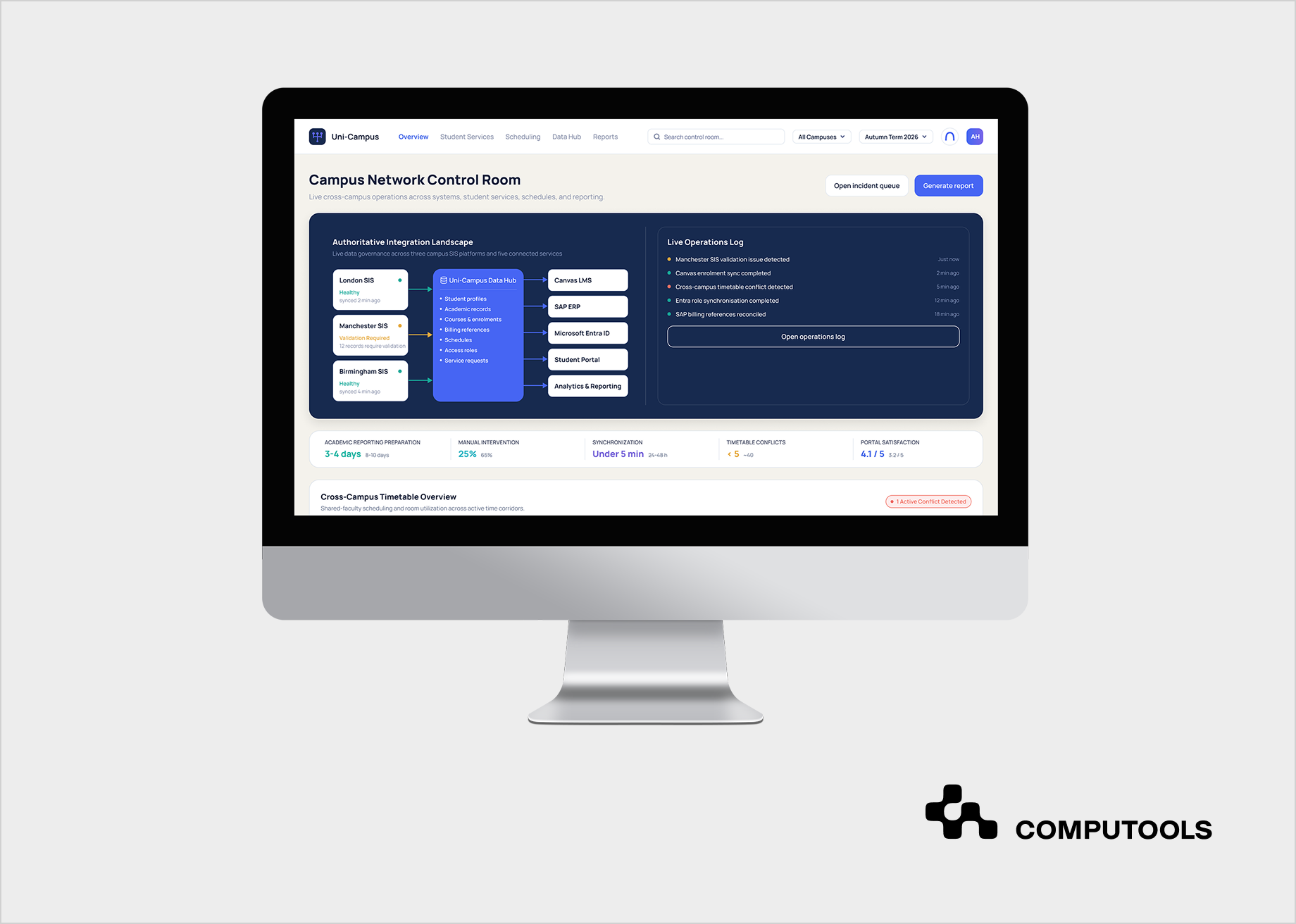
The project provided API integration to connect three legacy SIS with Canvas LMS, SAP ERP, Microsoft Entra ID, student portal, analytics, and various integration services.
A unified data layer enabled integration of course, scheduling and academic record of students. Access permissions were integrated at various levels using Azure Active Directory and Microsoft Graph.
The technical stack comprised React, Next.js, TypeScript, Node.js, NestJS, PostgreSQL, Azure, Docker and Terraform. REST APIs, webhooks, LTI 1.3, scheduled integrations, Microsoft Graph API and Microsoft Azure AD were used for various integrations.
The most relevant results for university scheduling were:
| Operational indicator | Before | After |
| Cross-campus scheduling conflicts | About 40 per semester | Fewer than 5 |
| Cross-campus data synchronization | 24–48 hours | Under 5 minutes |
| Academic reporting preparation | 8–10 business days | 3–4 business days |
| Routine requests requiring manual intervention | 65% | 25% |
The project also illustrates an important architectural distinction. Uni-Campus focused on integration, data consistency, and academic operations. A dedicated scheduling product can build on that foundation and introduce constraint-based optimization, resource planning, and automated timetable generation.
How to build university scheduling software in 8 development steps
Developing a university timetable system is a challenge because it represents thousands of connected decisions. Every course must be scheduled to an appropriate time slot. Every instructor is available to teach during a certain window. Every classroom is restricted based on capacity, equipment, and other uses. The platform should also retain flexibility to evolve as requirements change during an academic year.
Step 1. Define academic scheduling rules and institutional priorities
The first challenge when dealing with higher education scheduling software is to establish a difference between constraints and recommendations.
An engineering department, for example, may require specialized laboratories, whereas a business school may require larger lecture halls. Some instructors may divide their time between teaching and research, or be located at different campuses. The scheduling engine must be aware of these restrictions to properly assign the resources.
An approach that may be helpful is to classify the constraints as “hard” and “soft.” “Hard” constraints define the validity of a scheduling assignment, and “soft” constraints help the university select the most optimal assignment among a set of valid scheduling assignments.
| Hard constraints | Soft constraints |
| An instructor cannot teach two classes simultaneously. | Minimize gaps between teaching sessions. |
| A classroom cannot host overlapping lectures. | Prefer rooms near the instructor’s department. |
| Room capacity must accommodate enrollment. | Reduce unused classroom capacity. |
| Mandatory courses for the same student group cannot overlap. | Avoid early or late classes when possible. |
| Specialized courses require suitable facilities. | Respect preferred teaching hours. |
For example, an instructor is available at 8 a.m. and 2 p.m. Staff would accept either of those assignments. The soft constraint, however, would require the timetable to be as travel-efficient and student-attendance-friendly as possible.
For teams deciding how to build a university scheduling system, this distinction should be established during discovery, before selecting an optimization technology.
Step 2. Design the academic data model and system architecture
The quality of scheduling systems relies on the ways academic data is structured and communicated. A course is different from a course section. One course can have many sections. Sections may vary based on the instructor, classroom requirements, enrollment limits, and more.
These relationships must be reflected in the data model. There are some core entity types that the system needs to define. These include course, section, term, instructor, campus, building, room, time slot, student group, enrollment and various versions of schedules.
Additionally, the system needs to define what each type of data entity means. For instance, enrollment and course records may be owned by the SIS. Workload and faculty appointments may be maintained by the HR/ERP systems. The characteristics and scheduled usage of a room may be controlled by the facilities management system.
In these situations, the scheduling solution should use an API or integration layer to access the information rather than creating duplicative data models.
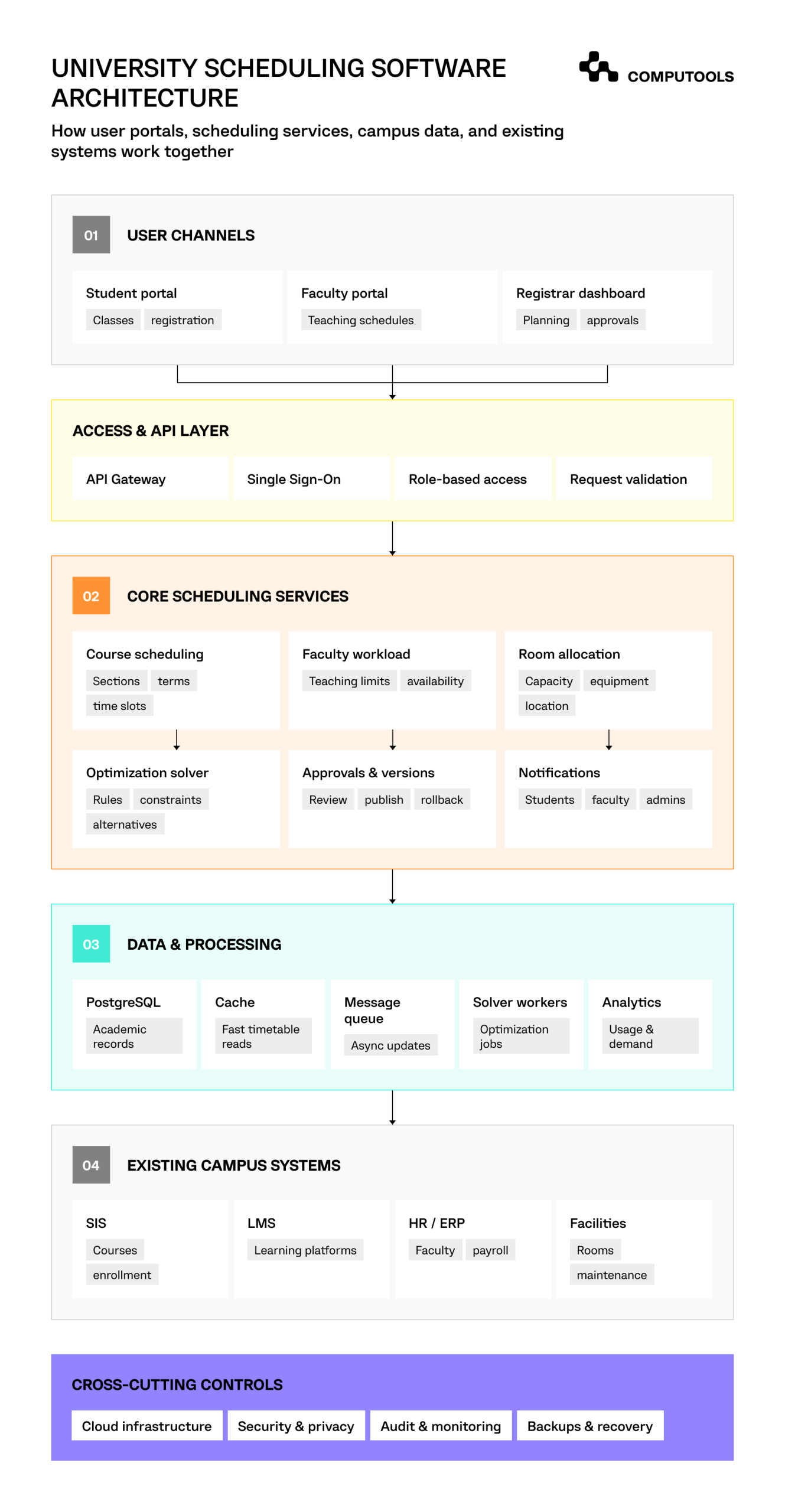
A university scheduling platform can be divided into four main layers.
| Layer | What it does |
| User interfaces | Allow administrators to manage timetables, faculty to check teaching schedules, and students to view their classes. |
| Scheduling services | Assign courses to classrooms and instructors, calculate teaching hours, and identify scheduling conflicts. |
| Optimization engine | Generate timetables based on classroom availability, faculty schedules, student needs, and university rules. |
| Data and integration layer | Store scheduling data in PostgreSQL, connect with SIS and LMS through APIs, and use caching, message queues, and synchronization services to keep information up to date. |
In Uni-Campus, the Computools team faced a comparable data coordination problem across three separate SIS environments. The project introduced a normalized data layer while preserving the university’s existing systems of record.
The same principle applies to academic resource scheduling. If one campus updates instructor availability while another application continues using an older record, even an advanced algorithm may produce invalid assignments.
For more detail on these dependencies, see Computools’ guide to integrating SIS, LMS, and ERP systems in higher education.
Step 3. Develop a constraint-based timetable optimization engine
This is the central technical challenge. A scheduling system has to consider multiple variables like courses, instructors, classrooms and available time slots. The number of possible combinations increases quickly as an institution adds departments, sections and resource constraints.
Let’s consider a university that has to schedule 120 engineering laboratory sessions, taught by 14 instructors in eight specialized rooms. Sessions are defined by limits on their duration, the equipment in the room, the qualifications of the instructor, the maximum number of students that can enroll, and the times that are available. Some student groups must attend several sessions without conflict. Evaluating all the combinations of session constraints is not feasible.
One method to approach a course timetable optimization is constraint programming. Google’s OR-Tools provides CP-SAT solver that allows programmers to model scheduling problems with mathematical constraints.
The system starts by eliminating assignments that break mandatory constraints. It then evaluates assignments against preferences that the institution has. These could include faculty convenience, student assignment conflicts and room utilization.
A simplified scoring model might assign different weights to:
- Student timetable conflicts.
- Unused classroom capacity.
- Gaps between faculty teaching sessions.
- Travel between campus locations.
- Unfavorable teaching hours.
When possible, the engine should return multiple possible solutions and allow administrators to compare the trade-offs. The engine should also provide an explanation for why a solution doesn’t exist.
For example, let’s say there are three different lab sections that all need to use a specialized lab during the same two-hour time block. Instead of leaving these sections unscheduled, the application should find these constraints and provide options.
Step 4. Automate faculty workload and classroom allocation
Even a conflict-free timetable can use university resources inefficiently. An instructor may receive a schedule with long gaps between lectures. Another may exceed contractual teaching hours. A classroom designed for 180 students may repeatedly host groups of 35 while smaller rooms remain fully booked.
Specific logics are required for faculty workload management. These logics should account for contractual teaching limits, subject qualifications, available administrative duties, research and travel commitments, and cross-campus travel time.
Depending on university policy, workload calculations can factor in seminars, lectures, laboratory supervision, and online instruction differently. Classrooms also require a separate calculation process and, therefore, a classroom allocation system.
The best way to determine if a space is efficiently used is to compare the booked time to the total time that it is available (room time utilization). But this metric can be misleading without considering other factors. For example, a large lecture hall that is only partially used during a booking would be more efficient than a smaller lecture hall used at full capacity.
Seat utilization helps determine how efficiently space is used. By coupling these two metrics, universities can allocate classroom space more efficiently and use data to inform strategic decisions about space and facility management.
Step 5. Connect course registration with student timetables
A school can create a schedule with no conflicts, and students still won’t be able to sign up for required courses. This occurs when parts of the schedule don’t connect the various combinations of modules students need to fulfill in order to graduate.
The system should interconnect academic planning and student enrollment, including prerequisites, required modules, electives, and class capacity, and the other way around.
Let’s say 180 students need to take a second-year required course, but the university only offers 2 sections of 60 seats each. The scheduling solution should identify and correct this situation before the registration process starts.
In addition to doing this, the system could suggest other available course sections, find bigger available classrooms and/or alert Academic Operations about this issue.
The student course scheduling system must validate student selections of course offerings. Registration should prevent time and other conflicts and enforce rules like prerequisites, held or reserved seats, and restrictions on the number of students who can enroll in a course section.
Waitlists create further constraints. If a space becomes available, the system must verify the eligibility of the student and assign the space to that student before assigning it to another student on the waitlist.
To ensure fairness to all students, changes to enroll in a course section should use transactional controls and be updated concurrently to prevent the same student from getting the final available course section in a course offering.
The connection of scheduling and registration allows universities to manage course availability based on actual student demand, instead of guesstimates from departments.

Launch university scheduling software within 1–3 months to automate course, faculty, and classroom allocation, reduce administrative costs, eliminate scheduling inefficiencies, and improve resource utilization across departments.
Step 6. Build administrative workflows and real-time schedule updates
University schedules change after they’re published. Teachers become unavailable. Class enrollments exceed forecasts. Classrooms close for maintenance. New sections are added. Different departments have different ways of working. Administrative workflows dictate how quickly a university can adapt.
Let’s say a teacher calls in unexpectedly absent. The schedule app should identify affected sessions. It should check the availability of possible replacement instructors and assess if there are other possible time slots available. It should verify available classrooms. Then an administrator can review the requested change before it’s published.
The schedule app should have distinct states such as a draft, being reviewed, approved, published, and superseded. Each change should be documented and tracked with a version number and an audit trail. Administrators should be able to see who made a change, what was changed, and who was affected (e.g. instructors and students).
The app should be able to distinguish between two types of processing. For example, there should be immediate feedback when an administrator attempts to schedule a conflict. Full-semester optimization may require an asynchronous process to run in the background. Once changes are approved, they should be pushed to related applications using webhooks and APIs.
The Uni-Campus project demonstrates the value of reducing synchronization delays between campus systems. Its integration architecture brought cross-campus data synchronization down to under five minutes, substantially reducing the period during which departments could be working with inconsistent information.
Student and faculty interfaces also need clear notifications. A room change should reach the affected users with the new location and time, without generating unnecessary messages for everyone else.
Step 7. Introduce AI-powered scheduling and predictive analytics
AI can improve university scheduling, especially when institutions already have several years of reliable enrollment and resource data. However, applying AI to scheduling requires separating predictive functions from mandatory academic rules.
The constraint solver remains responsible for producing valid assignments. Machine learning can forecast demand, identify patterns, and recommend adjustments.
Several applications are worth considering.
| AI capability | Practical benefit |
| Enrollment forecasting | Estimates how many sections a course will require. |
| Classroom demand prediction | Establishes periods when laboratories or lecture halls may reach capacity. |
| Scheduling recommendations | Suggest alternative instructors, rooms, or time slots. |
| Workload analytics | Detects uneven teaching assignments. |
| Predictive conflict analysis | Identifies recurring scheduling problems. |
| Smart search | Finds suitable rooms or available instructors using natural-language queries. |
| Personalized notifications | Inform users about relevant changes and alternatives. |
For example, registration data may show increasing demand during final registration week for a particular elective.
A forecasting model should be able to analyze registration data to understand this trend and alert the university with enough time to secure a different classroom and arrange the necessary teaching capacity.
The above functions of the forecasting model rely on data being clean and structured. One of the challenges Computools discusses in a Big Data and Education article is how educational institutions can use academic data to help plan and allocate their resources.
While planning and forecasting should leverage AI and automation, final scheduling decisions must be explainable and conform to institutional policy and laws.
Step 8. Secure, test, and deploy the scheduling platform
The final stage of development has to allow for conditions where scheduling mistakes lead to the most disruption. These are generally course registrations, publication of timetables, the start of a new semester and planning for examinations.
The system will have to process thousands of schedule modifications while linked applications simultaneously adjust course enrollments, staff assignments and student records.
Performance testing should cover what happens in realistic operating conditions. For example, what happens if two administrators attempt to reserve the same laboratory at the same moment? Can the system recover when an SIS connection fails during publication? Will an earlier scheduled version remain accessible if a new one must be rolled back?
Security planning must also be done carefully for scheduling software development.
Role-based access should provide students, instructors, departmental administrators, registrars and facilities managers the access they are entitled to. The application should allow single sign-on via SAML or OpenID Connect to integrate with the institution’s identity provider. Records that contain sensitive information should be protected by encryption. Access logs should be retained and destroyed in accordance with the retention schedule.
Depending on the location of the institution, other regulatory grounds may be GDPR or UK GDPR and/or local accessibility requirements.
For teams that build university scheduling software, testing should include:
- Scheduling and assigning faculty to conflicting classroom duties.
- Scheduling and assigning faculty to classroom duties concurrently.
- Incorrect or delayed enrollment synchronization.
- Optimization jobs with no feasible solution.
- Permission and authentication failures.
- Timetable publication and rollback.
- Keyboard navigation and mobile accessibility.
Integrations and rules should be validated prior to broad implementation across multiple campuses.
Upon launch and over time, track schedules and resources that result in administrative overrides, delays in synchronization, failed assignments and/or unresolved conflicts to determine if rules or resource data need adjustment.
How to measure the business value of university scheduling software
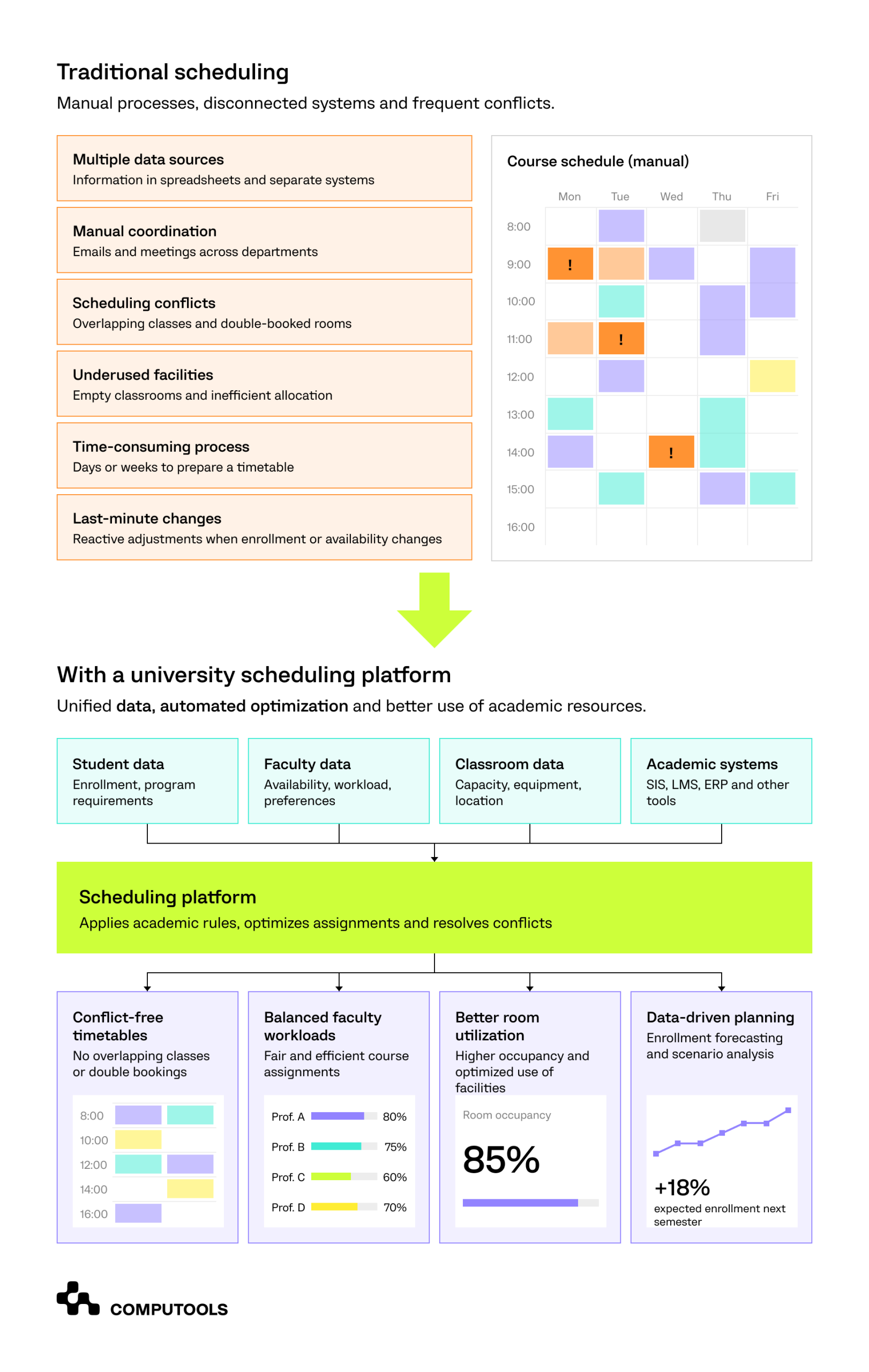
A shorter timetable preparation cycle is useful, but universities should evaluate a wider set of operational results. The most relevant indicators concern academic resource usage, administrative workload, student access, and schedule stability.
| KPI | What universities should measure |
| Scheduling conflict rate | Unresolved room, instructor, and student timetable conflicts. |
| Timetable preparation time | Hours or days required to generate and approve a semester schedule. |
| Classroom utilization | Percentage of available room hours used. |
| Seat utilization | Occupied seats relative to available classroom capacity. |
| Faculty workload balance | Differences between assigned teaching hours and workload policies. |
| Course availability | Percentage of students able to access required course sections. |
| Schedule change resolution | Time between a reported issue and an approved adjustment. |
| Synchronization performance | Time required to update connected academic systems. |
These metrics should be recorded before the team starts to build university scheduling software.
Why Computools for university scheduling software development?
Every spare classroom is an expense a university must absorb. Overlapping lectures create conflicts that students and academic staff must resolve. Changes in student enrollment mean even the best-planned timetables need readjustment.
Computools education software development service helps universities get more value from their existing teaching resources. We engineer tailored solutions to improve coordination of courses, instructors, classrooms, and academic systems. The team’s data engineering expertise is essential to tie enrollment records, faculty assignments, and classroom information together. Web development services give administrators practical tools to compare scheduling options, resolve conflicts, and approve changes.
The benefits extend to students and instructors. Through eLearning software development and EdTech software development, Computools supports the integration of academic timetables with learning platforms, student portals, and other digital services.
There is also considerable room for smarter planning. AI development services empower institutions to use historical enrollment patterns to anticipate demand, identify potential classroom shortages, and evaluate resource requirements before registration begins.
Our clients report:
- fewer timetable revisions;
- better classroom occupancy;
- more balanced teaching workloads;
- greater flexibility to accommodate student demand.
Computools makes these improvements possible within the institution’s academic infrastructure, keeping modernization manageable as programs and enrollment requirements change.
Better university scheduling starts with better coordination
University schedules often limit where and when students can take classes. Unfinished schedules can leave lecture halls empty while overloading instructors and creating schedule conflicts for compulsory classes. As a result, admin teams spend long days making adjustments.
The foundation of a university scheduling system is integrating course selection, faculty schedules, classroom capacity, and academic policies. Such automation can solve scheduling conflicts, optimize the use of campus resources, and accommodate last-minute changes to schedules.
Results from Computools’ Uni-Campus project demonstrate the potential of improved information flow. On three campuses, with a total population of 25,500+ students, scheduling conflicts decreased from approximately 40 to less than 5. Synchronization of academic data also improved from 24-48 hours to less than 5 minutes.
Computools
Software Solutions
Computools is an IT consulting and software development company that delivers innovative solutions to help businesses unlock tomorrow.