
THE AUTHOR:

A shipment can exist in several systems at the same time: an ERP holds the order and financial data, a WMS manages inventory and fulfillment, a TMS plans transportation, and carrier or tracking platforms report what is happening in transit. When these systems exchange incomplete or delayed information, dispatchers have to reconcile statuses manually, customers receive inconsistent updates, and operational teams respond to exceptions later than they should. Logistics data integration creates a connected data layer in which shipment, inventory, transportation, and tracking events can move between these systems without repeated manual reconciliation.
Computools has addressed this problem in real logistics operations. For Navis Horizon, a port logistics operator in Hamburg, we consolidated AIS, GPS, carrier-event data, multiple carrier APIs, and port-event systems into a single operational platform. Before implementation, dispatchers collected updates manually from carrier portals, port messages, and spreadsheets. The resulting platform automated shipment status updates, supported predictive delay detection, and gave dispatchers and customers a consistent view of cargo movement. The project reduced dispatcher workload by 40%, accelerated shipment incident resolution by 18%, and increased customer satisfaction by 23%.
This guide applies the same integration principles to a broader logistics environment. It explains, step by step, how to map existing systems, define data ownership, connect TMS, WMS, ERP, OMS, carrier platforms, tracking services, and IoT sources, establish reliable synchronization, and use the resulting data foundation for workflow automation, real-time visibility, and predictive operations.
What is logistics data integration, and what should it connect?
It is the process of collecting, standardizing, synchronizing, and distributing operational data across the systems involved in order fulfillment, warehousing, transportation, tracking, finance, and customer service.
Data integration keeps information consistent and available across applications. Shipment IDs, pickup statuses, ETAs, inventory states, and delivery confirmations need to refer to the same business events wherever they appear. System integration connects application workflows, allowing an event in one platform to trigger an action in another.
A typical logistics ecosystem may include:
| System | Primary role | Data exchange |
| OMS | Captures and manages customer orders | Order details, customer data, fulfillment requirements, order status |
| ERP | Manages financial and enterprise records | Orders, master data, costs, invoices, suppliers, customers |
| WMS | Controls warehouse execution | Inventory, allocation, picking, packing, shipment readiness |
| TMS | Plans and manages transportation | Loads, routes, carriers, pickup windows, ETA, transportation costs |
| Carrier platforms | Execute and report transportation activities | Booking confirmation, pickup, transit events, delays, proof of delivery |
| Tracking platforms | Monitor shipment or asset movement | GPS/AIS position, timestamps, route progress, tracking events |
| IoT systems | Capture physical asset and cargo conditions | Location, temperature, pressure, equipment status, sensor events |
| CRM/customer portal | Provides customer-facing visibility and communication | Shipment status, ETA, alerts, documents, service requests |
Each system remains responsible for its own operational domain. The integration layer maps records between applications, validates incoming data, applies synchronization rules, and distributes updates to the systems that depend on them. This gives operations teams consistent shipment and order information without changing the core responsibilities of the TMS, WMS, ERP, or tracking platform.
Navis Horizon followed the same principle in a maritime environment. Computools consolidated data from AIS, GPS, carrier APIs, and port-event systems into a unified operational stream. The resulting data foundation supported automated status detection, alerts, predictive delay analysis, customer updates, and AI-assisted workflows.
Why does logistics data become fragmented?
Fragmentation usually develops when logistics systems are introduced at different times, use different data models, and exchange information through isolated integrations or manual processes.
Legacy ERP, warehouse, transportation, and tracking platforms often store the same shipment under different identifiers and update records on different schedules. A warehouse may confirm that an order is ready while the TMS still shows the previous status, or a carrier portal may report a delay that has not yet reached the customer-facing system. These gaps reduce visibility and force operations teams to verify information across several sources.
Point-to-point connections add another layer of complexity. Early logistics software integration often starts with direct links between individual applications, carriers, or tracking providers. As the ecosystem grows, every new connection introduces another mapping, authentication method, data contract, and failure point. Changes in one system can then affect several dependent interfaces and increase maintenance effort.
Manual reconciliation usually fills the remaining gaps. Dispatchers copy carrier updates into spreadsheets, warehouse teams re-enter shipment data, and customer service checks several platforms before responding to a status request. These tasks increase processing time and make operational decisions dependent on how recently each source was updated.
Delayed or inconsistent data affects more than shipment tracking. It can postpone exception handling, create incorrect ETAs, slow billing, generate duplicate customer notifications, and reduce confidence in operational reports. Identifying these dependencies is therefore the first practical step before redesigning the integration environment.
How to structure the data integration process step by step
The following steps explain how to move from fragmented logistics data to a structured integration setup.
Step 1. Map systems, data owners, and operational dependencies
Integration planning should start with a clear map of which systems create, update, and consume each operational record.
A logistics company may have the same shipment represented in an OMS, ERP, WMS, TMS, carrier portal, tracking service, and customer-facing application. These records often contain different identifiers, status values, timestamps, and update frequencies. Mapping the current supply chain data flow shows where information originates, which system can change it, and which downstream processes depend on that update.
The assessment should also define the operational problem the integration is expected to improve and establish a baseline for relevant KPIs. Depending on the workflow, these may include manual reconciliation time, shipment-status latency, exception detection time, data-transfer failures, or incident resolution time. These baselines provide the reference point for architecture priorities and later production validation.
| Area | What to document |
| Systems | ERP, OMS, WMS, TMS, carrier platforms, tracking services, CRM, customer portals, IoT sources |
| Data ownership | Which application is authoritative for orders, inventory, shipment plans, locations, costs, and delivery status |
| Integration points | APIs, EDI connections, file transfers, database exchanges, webhooks, manual uploads |
| Update requirements | Which records need immediate updates and which can be processed on a scheduled basis |
| Operational dependencies | Workflows, alerts, customer updates, billing actions, and planning decisions triggered by each data change |
The audit should also identify manual reconciliation points. If dispatchers compare carrier portals with spreadsheets before updating shipment status, or warehouse teams re-enter transportation data already stored in another system, those tasks indicate missing or unreliable connections. Prioritizing these gaps helps the integration roadmap focus first on workflows that consume the most time or create the highest operational risk.
Navis Horizon had a similar visibility problem. Dispatchers worked with shipment information distributed across carrier portals, port messages, spreadsheets, AIS feeds, GPS data, and external carrier systems. Consolidating these sources required a clear understanding of how each data stream related to vessels, shipments, events, and operational decisions. That mapping provided the foundation for a unified platform that could process updates automatically and present consistent shipment information to dispatchers and customers.
Step 2. Define how data moves across the shipment lifecycle
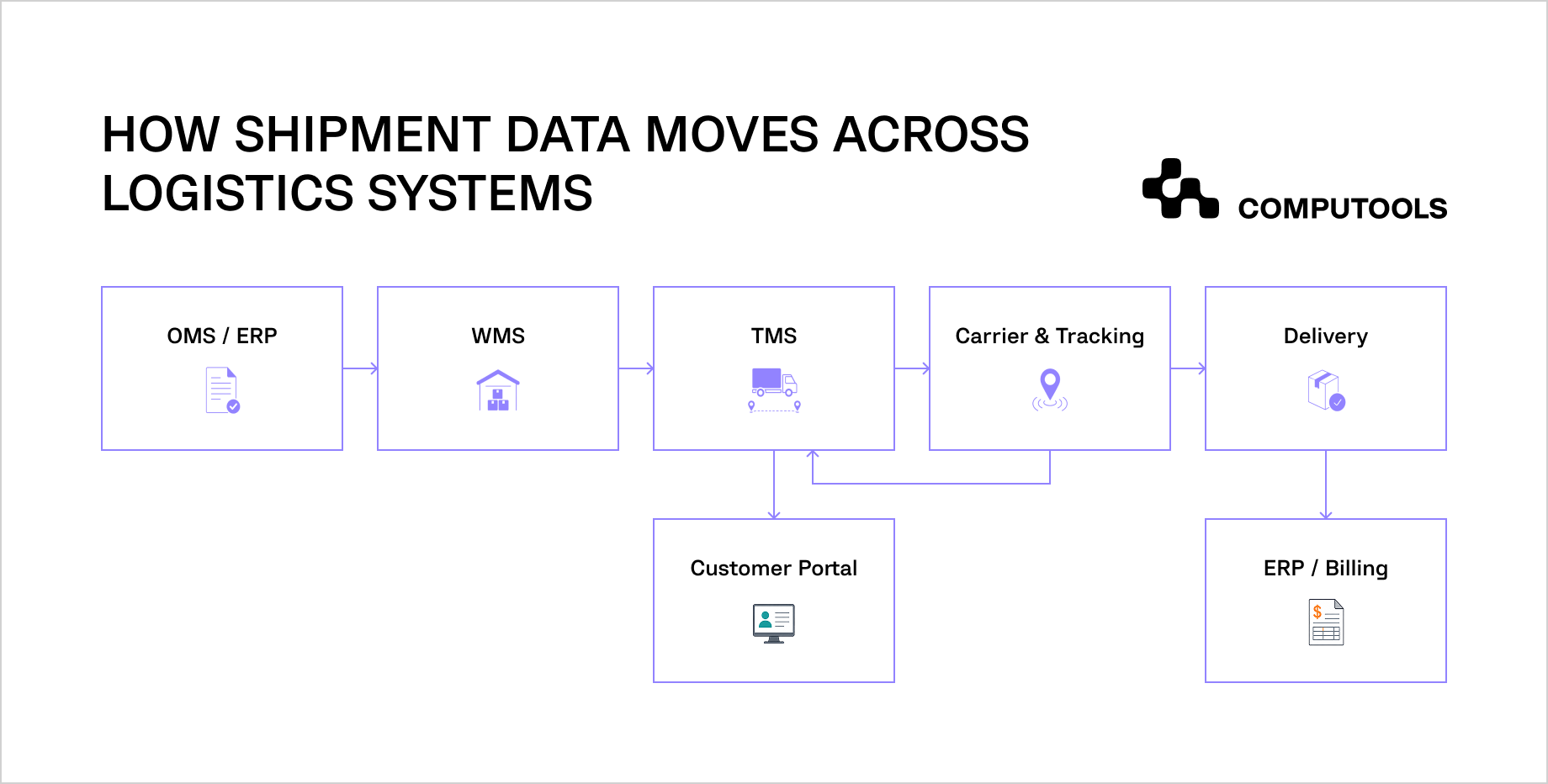
The integration design should follow the actual shipment lifecycle, from order creation and warehouse processing to transportation, delivery, billing, and customer updates.
A single shipment generates data in several systems, and each handoff depends on the previous one being complete and accurate. Mapping the full supply chain data flow helps teams define which events trigger updates, which fields move between applications, and which platform remains responsible for each record.
Order creation
The OMS or ERP creates the order record with customer data, destination, product details, quantity, service level, and fulfillment requirements. These fields become the reference data for warehouse and transportation processes, so identifiers, addresses, and order attributes need to remain consistent as the shipment moves downstream.
Warehouse execution
WMS integration connects the Warehouse Management System with stock allocation, picking, packing, loading, and shipment-readiness data. Once an order is prepared for dispatch, the WMS can send confirmed package counts, dimensions, weight, loading status, and pickup availability to transportation systems. Accurate warehouse data reduces dispatch corrections and prevents carriers from receiving outdated shipment information.
Transportation planning
TMS integration connects the Transportation Management System with shipment characteristics, routes, carriers, schedules, and transportation costs. The selected carrier, route, pickup schedule, expected delivery time, and transportation cost can then be distributed to warehouse, finance, and customer-facing systems.
Carrier execution and tracking
Carrier platforms return booking confirmations, pickup events, transit updates, delays, and proof of delivery. GPS, AIS, telematics, and third-party tracking services can supplement these milestone events with location and movement data. Reliable logistics data exchange between these sources and operational platforms gives dispatchers current shipment status and provides the inputs required for ETA recalculation and exception handling.
Delivery and financial closure
ERP integration connects the Enterprise Resource Planning system with delivery events, billing, cost allocation, invoicing, and settlement processes. A confirmed delivery can update the ERP with actual transportation data while also triggering customer notifications and closing the shipment in the TMS. Linking financial records to verified delivery events reduces manual reconciliation before billing.
For each transition, teams should document the source system, receiving system, trigger, required fields, validation rules, expected response, and failure path. This specification provides the basis for development, testing, monitoring, and later automation.
Step 3. Create a shared data model and synchronization rules
Master Data Management (MDM) establishes authoritative sources, shared identifiers, ownership, and quality rules for entities such as customers, carriers, locations, products, and assets.
The first task in supply chain data integration is to define which system owns each critical record. An ERP may remain authoritative for customers, suppliers, and financial data, while the WMS controls inventory and fulfillment status and the TMS owns transportation plans. Clear ownership prevents two applications from updating the same field independently and creating conflicting versions of an order or shipment.
Define a canonical data model
A canonical model gives connected applications a common structure for exchanging records even when their internal schemas differ.
Typical entities include:
- order ID;
- shipment ID;
- customer and consignee;
- origin and destination;
- carrier;
- vehicle or vessel;
- product or SKU;
- package dimensions and weight;
- planned and actual timestamps;
- shipment status;
- event type;
- cost and billing reference.
External records are mapped to this shared structure before they are distributed to other systems. A carrier status such as “picked_up,” for example, can be translated into the internal event model used by the TMS, customer portal, and analytics layer. This reduces custom mapping between every pair of applications and makes new integrations easier to add.
Set synchronization rules for each data type
Logistics data synchronization should reflect how quickly each record affects operations. Shipment location, delivery exceptions, warehouse readiness, and ETA changes may require event-based updates within seconds or minutes. Supplier records, reference tables, and some financial data can usually follow scheduled synchronization without affecting active transportation decisions.
Teams should define the update direction, frequency, conflict rules, and retry logic for every shared entity. These rules determine how the platform handles delayed messages, duplicate events, unavailable external systems, and records that arrive out of sequence.
Keep status definitions consistent across systems
Different applications often use different labels for the same operational event. One carrier may report in transit, another departing terminal, while an internal TMS uses a separate milestone model. Supply chain data synchronization requires these values to be normalized into a controlled set of statuses that downstream systems can interpret consistently.
Step 4. Design the integration architecture
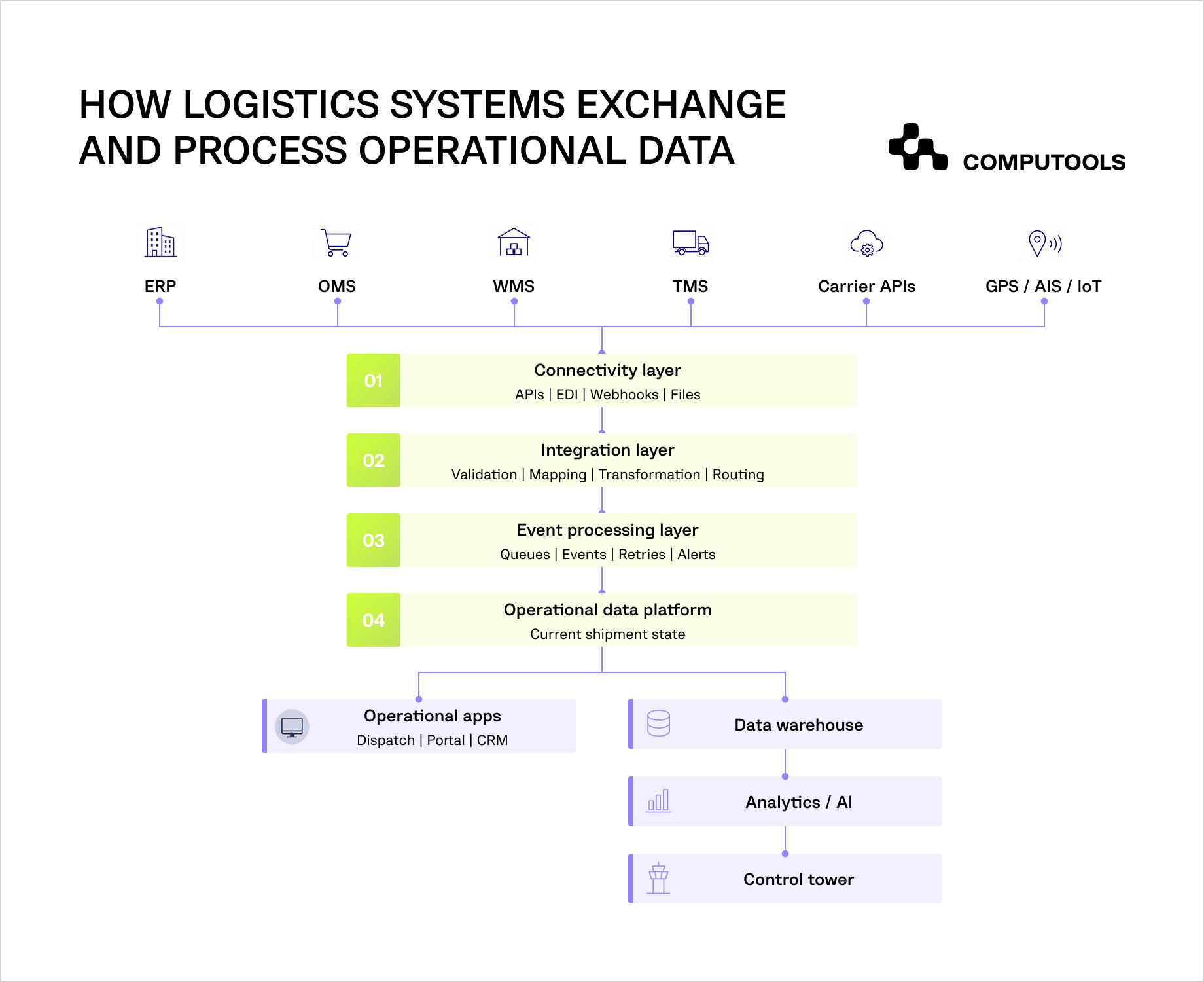
The architecture should separate connectivity, data processing, event handling, storage, and delivery so that workloads can scale independently and failures can be isolated more effectively.
A practical logistics data architecture usually connects operational applications through a shared integration layer that limits direct dependencies between individual systems. This reduces dependency between platforms and makes it easier to add carriers, tracking providers, warehouse applications, or customer channels without rebuilding existing flows.
Use APIs for direct system communication
Logistics API integration supports structured exchanges between ERP, WMS, TMS, OMS, carrier platforms, and external services. APIs are suitable for operations that require an immediate request and response, such as retrieving shipment details, creating a booking, checking inventory availability, or updating an order.
Each connection should define authentication, supported operations, request and response schemas, validation rules, rate limits, versioning, and error handling. These controls reduce integration failures when an external provider changes its interface or returns incomplete data.
Process operational events as they occur
Shipment operations generate events continuously: an order is packed, a vehicle leaves a warehouse, a vessel changes position, a delivery window changes, or a carrier reports a delay. Event-driven processing allows these updates to reach dependent systems without waiting for scheduled synchronization.
A message broker or event bus can receive real-time logistics data, route events to the correct consumers, preserve processing order where required, and isolate temporary failures. The TMS may use a delay event to recalculate ETA while the customer portal updates the shipment status and an alerting service creates an exception for the dispatcher.
Build a controlled data processing layer
A logistics data pipeline validates incoming records, converts external formats into the canonical model, removes duplicates, enriches events with internal identifiers, and routes processed data to operational databases, analytics platforms, or downstream applications.
The pipeline also needs failure handling. Invalid records should be logged and isolated, failed deliveries retried, and unresolved messages made visible to technical or operational teams. Without these controls, integration errors can propagate into ETA calculations, billing records, customer notifications, and performance reporting.
Consolidate operational data for analytics and control
Operational systems need current records for execution, while analytics teams need historical data that can be compared across shipments, carriers, warehouses, routes, and time periods. A data warehouse or analytical storage layer can collect normalized events from the integration environment without increasing query load on the systems responsible for daily operations.
A logistics control tower can use this consolidated data to combine shipment status, ETA changes, exceptions, inventory information, carrier performance, and operational KPIs in one view. Historical records also provide the data required for trend analysis, delay prediction, route evaluation, and performance reporting.
The architecture should keep operational and analytical workloads separate. Active shipment events can remain in databases optimized for frequent updates, while historical and aggregated records move to a warehouse or data platform designed for reporting and model training.
Companies connecting multiple operational platforms can use logistics software development services to design the integration layer, modernize legacy connections, and establish reusable data flows across operational systems.
The same architecture can support a broader operational visibility layer that combines shipment events, ETA changes, exceptions, and port data in one interface. We cover this approach in How to Build a Real-Time Cargo Visibility Platform for Ports.
Decouple core systems from external providers
Direct point-to-point connections create dependencies between applications and become harder to maintain as the number of systems grows. An integration layer gives logistics system integration a stable intermediary for routing, transformation, authentication, and monitoring while ERP, WMS, TMS, and external providers retain their existing responsibilities.
For Navis Horizon, Computools used Go backend services to process real-time AIS/GPS streams, PostgreSQL to store shipment events and tracking history, and WebSockets to deliver live status updates to the interface.
High-level integration architecture
| Layer | Main responsibility |
| Source systems | ERP, OMS, WMS, TMS, carrier platforms, GPS/AIS, IoT |
| Connectivity layer | APIs, webhooks, EDI, file exchange, external connectors |
| Integration layer | Authentication, routing, validation, transformation |
| Event layer | Message queues, event streams, retries, asynchronous processing |
| Data layer | Operational records, event history, analytics storage |
| Application layer | Dispatcher tools, customer portals, alerts, reporting, AI services |
Step 5. Connect tracking, telematics, and IoT data to business records
Tracking data becomes operationally useful when every location or sensor event can be linked to a shipment, vehicle, vessel, order, or other business entity.
GPS trackers, AIS feeds, telematics platforms, RFID systems, and IoT sensors can generate updates far more frequently than ERP, WMS, or TMS records. These sources may also use separate device identifiers, timestamps, coordinate formats, and event structures. The integration layer needs to resolve those differences before tracking events can support ETA calculations, exception management, customer updates, or asset monitoring.
A common relationship can be structured as:
device → vehicle or vessel → load → shipment → order → customer
This mapping gives operational systems the context required to interpret a physical event. A GPS coordinate identifies where a vehicle is, while the linked shipment record determines which delivery is affected, which customer should receive an update, and which dispatcher owns the exception.
Normalize tracking events before distribution
Raw tracking feeds can contain duplicate coordinates, delayed messages, missing intervals, or events received out of sequence. Processing rules should validate timestamps and identifiers, remove duplicates, associate signals with the correct asset, and convert provider-specific events into the shared status model.
For maritime operations, AIS adds vessel position, speed, course, and movement information that can be combined with port and carrier events. Companies building this type of connected operational environment may require maritime software development services to integrate maritime data sources with planning, tracking, and customer-facing workflows.
Connect sensor data to operational decisions
IoT data can extend shipment visibility beyond location. Temperature, humidity, pressure, equipment state, fuel data, or cargo-condition readings can be associated with operational rules and thresholds. An abnormal reading can create an exception, update the shipment record, and notify the responsible team without requiring staff to review a separate monitoring platform.
IoT development services can support the device connectivity, ingestion, processing, and application logic required to incorporate these signals into logistics workflows. The business value depends on connecting sensor events to actions: identifying a potentially damaged shipment earlier, detecting equipment problems, or giving operations teams current information before a deviation affects delivery.
Navis Horizon used the same principle for vessel and shipment tracking. Navis Horizon aggregated AIS feeds, partner GPS devices, carrier APIs, and port events into a unified operational stream, giving dispatchers a consistent view of cargo movement and vessel status.
For a deeper look at how vessel-position data can be normalized, matched with operational records, and distributed across maritime systems, see our guide on How to Develop AIS & GPS Data Integration Software for Maritime Operations.
Step 6. Automate status updates and exception handling
Once operational data is connected and normalized, the platform can use events to trigger updates, alerts, and workflow actions without manual intervention.
In integrated logistics systems, warehouse, transportation, tracking, and customer-facing applications can react to the same event according to predefined rules. A warehouse release can update the TMS, a carrier delay can create a dispatcher exception, and confirmed delivery can update the customer portal and financial records. These workflows reduce repetitive status checks and shorten the time between an operational change and the response it requires.
Define event-based workflow rules
Automation should start with events that have clear operational consequences.
Common examples include:
- order ready for shipment → release transportation planning;
- carrier booking confirmed → update shipment status;
- pickup completed → start in-transit tracking;
- ETA changes beyond an agreed threshold → create an exception and notify responsible teams;
- delivery completed → close the shipment and pass confirmed data to billing;
- sensor threshold exceeded → flag the shipment or asset for review.
Each rule should specify the triggering event, required data, affected systems, expected action, escalation path, and fallback process. This keeps automation predictable and makes failed workflows easier to diagnose.
Build exception handling around operational impact
Routine events can move through the workflow automatically, while deviations require prioritization. A short delay with no effect on the delivery window may need only a status update. A delay that threatens an SLA, connecting shipment, warehouse slot, or customer commitment should generate an operational alert.
The second layer of logistics system integration therefore needs to cover exception workflows as well as normal data exchange. Dispatchers should be able to see the affected shipment, current status, related events, responsible carrier, ETA impact, and available next actions in the same operational context.
Apply AI where connected data supports a clear decision
Historical and current shipment data can support predictive ETA models, anomaly detection, delay-risk scoring, and automated summaries for dispatchers. AI development services are relevant when these functions need to be integrated with operational workflows and evaluated against measurable outcomes such as detection time, ETA accuracy, manual workload, or incident resolution speed.
Navis Horizon used centralized tracking and event data to support predictive delay detection, automated shipment status updates, alerts, and AI-assisted operations. These capabilities reduced routine monitoring and helped dispatchers respond to shipment exceptions faster.
Once shipment and event data is centralized, AI can support dispatcher queries, exception summaries, and operational decision-making. Our guide to How to Build AI Assistant Software for Logistics Operations explains how these capabilities can be integrated into logistics workflows.
Step 7. Make integrations reliable, observable, and secure
Production integrations need governance, monitoring, recovery mechanisms, and access controls so that failures can be detected and resolved before they affect active shipments or downstream processes.
Govern APIs and integration contracts
Every API connection should have a defined owner, authentication method, version, schema, rate limits, timeout rules, and change process. Contract changes need to be tested against dependent applications before deployment because a modified field, status value, or endpoint can disrupt warehouse, transportation, billing, or customer workflows.
API governance should define how deprecated versions are handled, which provider change-notification channels are monitored, and how compatibility is tested before an external update reaches production.
Monitor data movement and integration health
Monitoring should cover the full path from source system to downstream consumer. Useful signals include failed requests, queue backlogs, processing latency, stale records, synchronization errors, unavailable providers, and abnormal drops in event volume.
Operational teams need visibility into failures that affect shipments, while technical teams need enough context to trace the affected integration, payload, timestamp, and processing step. Clear observability shortens diagnosis time and helps teams distinguish a source-system problem from a transformation, routing, or delivery failure.
Build recovery into critical workflows
Temporary failures should not require teams to reconstruct shipment history manually. Retry policies can handle short service interruptions, dead-letter queues can isolate records that cannot be processed, and reconciliation jobs can compare expected and received events after a connection is restored.
Recovery logic should reflect business impact. A delayed reference-data update may tolerate scheduled retry, while a failed delivery-status event may require immediate escalation because it can affect customer communication, SLA monitoring, and billing.
Protect access to operational and customer data
Access controls should follow system roles and data sensitivity. Role-based access control can limit which users and services can view or modify shipment, customer, carrier, financial, or sensor data, while audit logs record changes and administrative actions.
Encryption should protect data in transit and at rest, and service accounts should receive only the permissions required for their integration tasks. Companies modernizing complex integration environments can use software engineering services to address architecture, security, observability, and release controls as part of the same delivery process.
Navis Horizon applied similar controls through a modular backend, encrypted data exchange, role-based access, and centralized processing of external carrier and tracking data. These measures supported reliable live operations while keeping multiple external data sources connected to one operational platform.
Step 8. Roll out the integration incrementally
The implementation roadmap should move from one prioritized operational flow to broader system coverage, with validation checkpoints before each expansion.
Prioritize the first production workflow
The first release should target a workflow with clear operational value and measurable pain points. A company may start with the path from warehouse readiness to transportation planning and shipment tracking, where disconnected updates create dispatcher workload, delayed customer notifications, or repeated data entry.
The first release should be evaluated against the baseline KPIs established during the initial assessment. Depending on the workflow, these may include manual processing time, status-update latency, failed data transfers, exception detection time, incident resolution time, or the number of records requiring reconciliation. Baselines make it possible to evaluate whether the integration changes the process in production.
Build the shared integration foundation
The first implementation should establish reusable components for connectivity, authentication, transformation, event processing, monitoring, and access control. New system connections can then reuse the same technical foundation, limiting the number of isolated interfaces that teams need to maintain.
Companies with legacy platforms or multiple external providers should assess existing dependencies and modernize critical connections while active logistics operations continue.
Validate a limited production scope
A pilot should cover a defined set of shipments, carriers, warehouses, routes, or users. Technical validation should measure data accuracy, processing latency, failed events, recovery behavior, and integration availability. Operational validation should confirm that dispatchers, warehouse teams, and customer-service users receive the information required for their daily decisions.
Issues found during the pilot can then be corrected before additional systems depend on the same data flows. This reduces execution risk and gives the team a concrete checkpoint for deciding whether the architecture is ready to scale.
Expand by business priority
Once the first workflow is stable, the integration can extend to additional carriers, warehouse locations, customer channels, financial processes, IoT sources, or analytics functions. Expansion should follow business value and dependency order, since connecting a lower-priority source rarely justifies delaying a workflow that removes significant manual work or improves shipment visibility.
Each rollout phase should have its own scope, acceptance criteria, responsible owners, and KPI targets. This makes progress measurable and prevents a large integration program from becoming one release with no intermediate validation.
Optimize after production data becomes available
Production monitoring provides evidence about processing delays, frequent failures, underused interfaces, recurring exceptions, and manual work that remains outside automated flows. These findings should feed the next development cycle.
The same data can support an ROI roadmap by comparing implementation and operating costs with reductions in manual effort, incident handling time, integration maintenance, and service delays. Continuous optimization keeps the platform aligned with operational changes as carriers, routes, systems, and customer requirements evolve.

Launch your logistics data integration solution in 1–3 months, not years, and give operations teams one connected data flow across TMS, WMS, ERP, and tracking systems with fewer manual handoffs and data gaps.
How Navis Horizon turned fragmented data into one operational view
Navis Horizon shows how fragmented tracking and operational sources can be consolidated into a shared data environment for dispatching, customer visibility, automation, and predictive analysis.
The client managed shipment information across carrier portals, port messages, spreadsheets, AIS feeds, GPS sources, and external carrier systems. Dispatchers had to collect and compare updates manually, which increased workload and delayed access to current shipment status.
Computools consolidated these sources into a modular operational platform that processed AIS and GPS signals, carrier APIs, and port events through a common data layer. Shipment events and historical records were centralized, while live updates were delivered to operational interfaces used by dispatchers and customers. The architecture created a consistent source of current shipment information across previously disconnected channels.
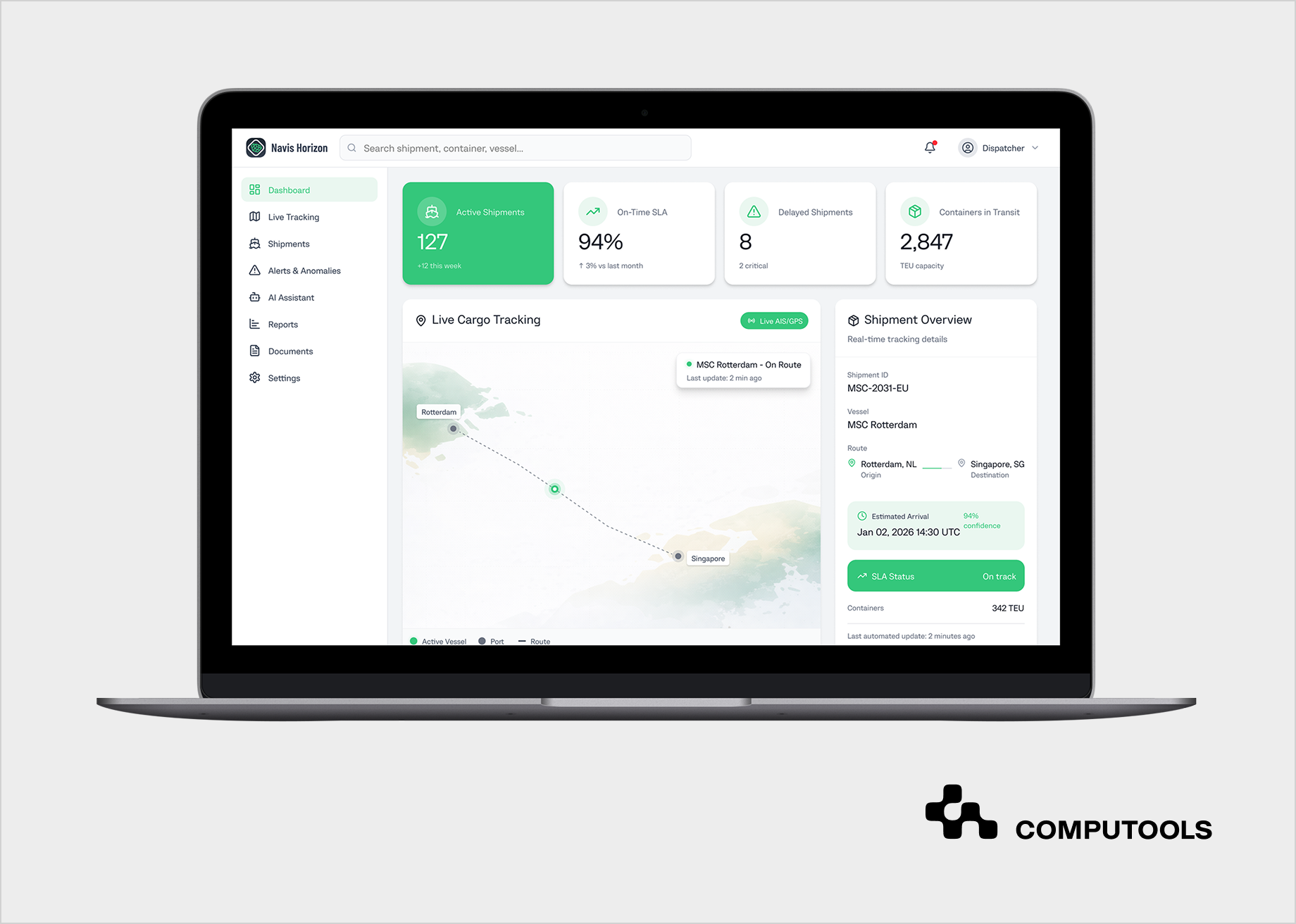
With centralized event data available, the platform could automate shipment status updates, detect delays, generate alerts, and support AI-assisted operational analysis. Dispatchers received current information in one interface and could respond to exceptions without checking several external systems.
The delivered solution reduced dispatcher workload by 40%, accelerated shipment incident resolution by 18%, and increased customer satisfaction by 23%. The project also demonstrates how maritime software development can connect vessel tracking, carrier data, port events, and operational workflows within one data environment.
Companies that need continuous vessel visibility can extend AIS-based tracking with satellite and other external data sources. The architecture and data considerations are covered in How to Develop Vessel Tracking Software with AIS & Satellite Data.
What should companies measure after integration?
Integration performance should be measured through data quality, processing reliability, operational response time, and the amount of manual work that remains in the workflow.
Technical monitoring should track failed requests, queue backlogs, synchronization errors, stale records, processing latency, and unavailable external services. Each logistics API should also be monitored for response time, error rates, authentication failures, and schema changes that can affect downstream systems.
Operational KPIs should show whether connected data improves daily work.
Relevant measures include:
- manual status checks and reconciliation time;
- shipment status update latency;
- exception detection time;
- incident resolution time;
- ETA accuracy;
- failed or duplicated shipment events;
- customer status requests;
- integration-related support cases;
- SLA performance.
These metrics should be compared with the baseline defined before rollout. This gives teams a clear basis for deciding which integrations need optimization and whether automation is reducing operational effort.
Conclusion
Connecting TMS, WMS, ERP, tracking platforms, carrier systems, and IoT sources gives logistics teams a consistent operational view across planning, execution, tracking, and financial workflows. A maintainable integration environment combines clear data ownership, shared data models, event processing, monitoring, and phased rollout while limiting the growth of point-to-point dependencies.
Computools
Software Solutions
Computools is an IT consulting and software development company that delivers innovative solutions to help businesses unlock tomorrow.