
THE AUTHOR:

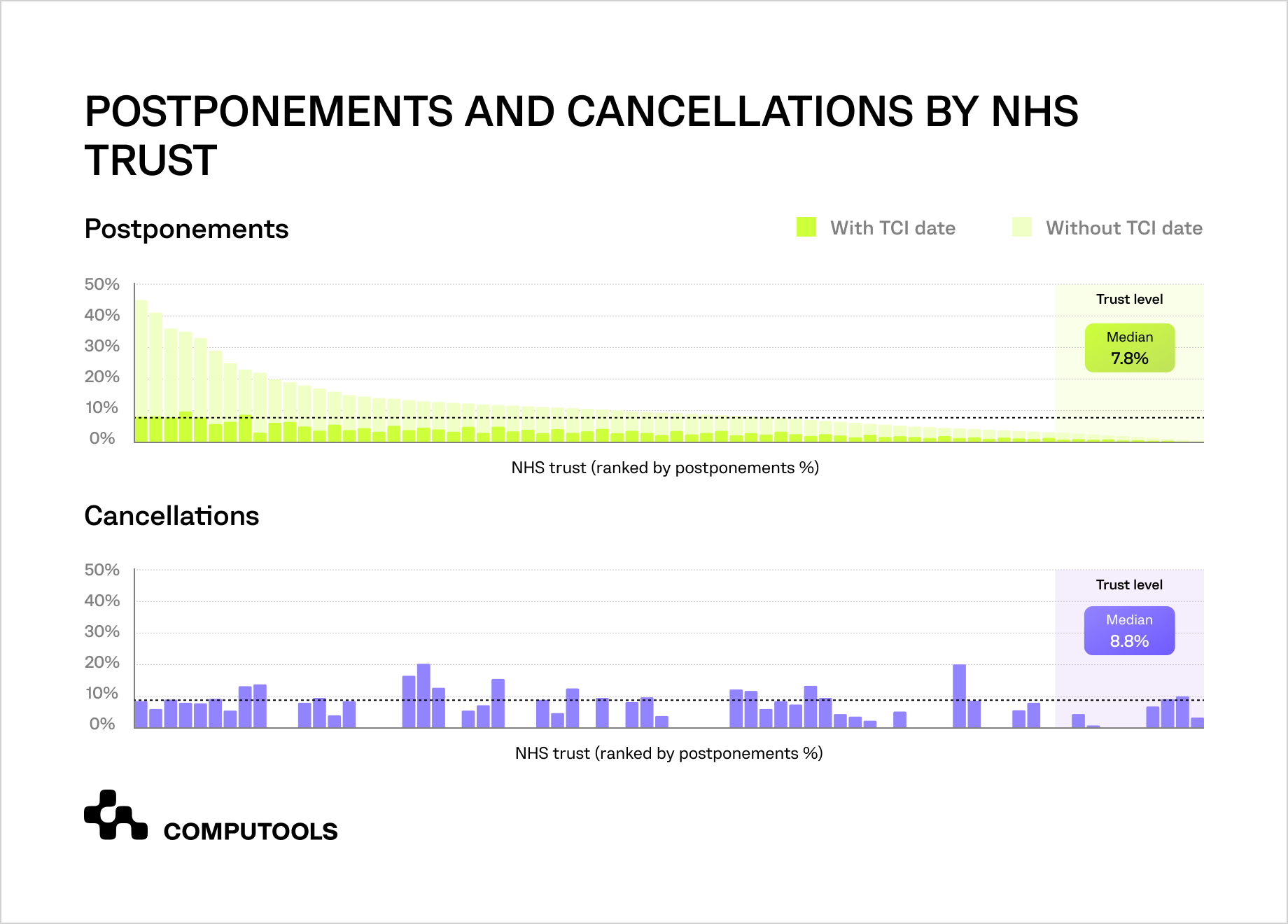
Hospitals need to develop operating room scheduling software when spreadsheets, separate calendars, and disconnected departmental systems can no longer coordinate growing surgical volumes. A national prospective service evaluation published in 2026 and conducted across 78 NHS England trusts during a seven-day period in November 2024 found that 9.9% of elective procedures were canceled within 24 hours of surgery, while 8.7% were postponed during preoperative assessment.
Individual trusts show substantial variation, with median trust-level rates of 8.8% for cancellations and 7.8% for postponements. These disruptions leave expensive capacity unused, extend waiting times, and force staff to rebuild schedules under time pressure.
Every surgical slot depends on the simultaneous availability of the surgeon, anesthesia team, procedure room, specialized equipment, patient documentation, and recovery capacity. Procedure durations vary, emergency cases consume reserved resources, and staff availability can change during the day. These dependencies make operating room management highly sensitive to delays: one reassigned or extended procedure can disrupt schedules across several clinical and administrative teams.
The US hospital behind SurgeryOps handled 30–50 daily procedures in multiple rooms. Manual coordination and isolated systems limited visibility into doctor availability, room use, and patient needs. Schedule changes needed repeated cross-team checks, causing planning errors, conflicts, and idle room time as workload increased.
How Computools helped a hospital develop operating room scheduling software
Computools translated the hospital’s planning constraints into SurgeryOps, a centralized platform that assigned patients to available physicians based on defined parameters, secured procedure room bookings, coordinated schedule changes, and detected conflicts across daily surgical operations. The solution replaced fragmented planning tools with one controlled workflow.
REST APIs connected the platform with the hospital’s internal systems, while DICOM support enabled structured access to diagnostic imaging through existing clinical applications. Role-based permissions, encryption, and audit logs protected patient information and recorded sensitive actions without extending the platform into clinical decision-making.
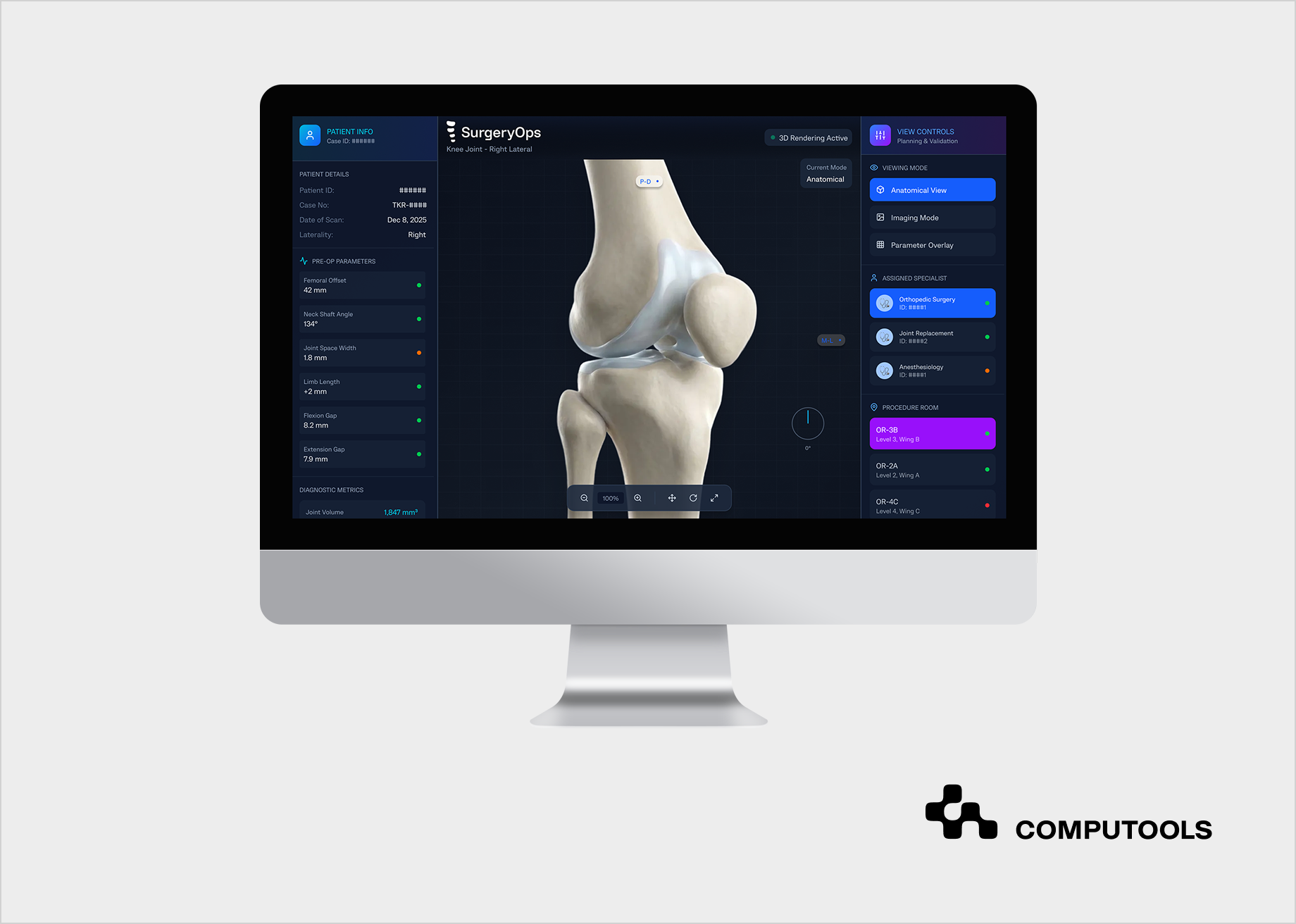
This approach to hospital workflow automation reduced manual planning time by 60% and planning errors by 40%. Automated coordination also reduced scheduling conflicts and idle time in procedure rooms by 98%, giving hospital teams a more reliable view of daily workloads and available capacity.
The project reflects Computools’ experience in healthcare software development services, including workflow analysis, system architecture, integration, security controls, and iterative delivery for regulated hospital environments. Based on this delivery experience, the following guide explains how to plan, build, integrate, and launch a scheduling platform for hospital surgical operations.
How to develop operating room scheduling software for hospitals and surgical centers: a step-by-step guide
1. Map the current surgical planning workflow
Begin with the planning process that hospital teams use today. Document how a case enters the schedule, who checks patient readiness, how a surgeon is assigned, where room availability is confirmed, and which team handles late changes. Include scheduled, urgent, and canceled cases because each follows a different operational path and creates different dependencies.
The workflow map should show every system, spreadsheet, calendar, message thread, and manual approval used during planning. Record where staff re-enters data, wait for confirmation, compare conflicting sources, or rely on personal knowledge to resolve gaps. These points reveal the actual scope of the future hospital scheduling software and prevent the project from digitizing a flawed process without removing its bottlenecks.
Each planning decision also needs an owner and a timestamp. Hospitals should know who can create a case, approve a room, change a physician assignment, release a reserved slot, or override a conflict warning. Clear ownership reduces ambiguous handoffs and gives the product team a basis for permissions, notifications, and audit trails.
For SurgeryOps, Computools used this workflow mapping to define how patient parameters, doctor availability, and procedure room usage should interact within one planning process.
2. Convert operational policies into scheduling rules
A scheduling platform can automate only the rules that the hospital has clearly defined. Product, clinical operations, and IT teams should document physician eligibility, room type, equipment requirements, expected procedure duration, preparation and turnover time, staffing ratios, patient priority, and recovery capacity for each procedure category. These requirements form the logic used to validate every proposed slot before it is added to the schedule.
The rules should distinguish constraints, preferences, and targets. Missing credentials, unavailable room, incomplete prep, or incompatible equipment should block bookings. Preferences like surgeon’s preferred room, procedure order, or hours can influence slots, but a coordinator can approve alternatives. Targets may include balanced workloads, reduced idle time, fewer late finishes, or reserved capacity for urgent cases.
This hierarchy keeps surgical scheduling software predictable. Users can see why a booking was rejected, which alternatives remain available, and which conditions can be overridden. Without explicit priority levels, the platform may treat a preference as a mandatory restriction or allow a booking that violates a clinical or operational requirement.
Rules for urgent procedures, overruns, staff absences, equipment failures, and same-day cancellations need the same level of detail. The platform should know which cases can be moved, which resources must be released, how far schedule changes can propagate, which teams receive an alert, and whether an open slot can be offered to a patient on the waiting list. Hospitals should also define escalation paths for situations where no valid alternative is available.
Manual overrides require controlled logic. The hospital should specify which roles can bypass a warning, which constraints can never be overridden, and which reason codes users must record. Every override should remain visible in the audit history and performance reports, since frequent exceptions may indicate an outdated rule, incomplete source data, or a workflow that needs redesign.
Scheduling policies also change over time. New equipment, updated staffing models, revised operating hours, and changes in clinical protocols can alter the available combinations. Rules should therefore be configurable, versioned, tested in a non-production environment, and approved by an accountable hospital representative before release. Version history allows teams to explain why a booking was accepted under one policy and rejected after a later update.
In SurgeryOps, doctor assignment was based on patient parameters and internal availability constraints. Computools translated these requirements into centralized planning logic that coordinated physicians and procedure rooms while leaving clinical judgment with medical staff. This boundary allowed the platform to reduce manual coordination without making treatment decisions or assigning clinical responsibility to an algorithm.
3. Create a unified model of rooms, staff, procedures, and availability
Scheduling logic depends on a consistent operational data model. The platform should represent surgeons, anesthesiology staff, nurses, procedure rooms, equipment, procedure types, patient readiness states, shifts, time blocks, and dependencies as connected entities with stable identifiers. Each entity needs a defined lifecycle, ownership rules, and relationships with other scheduling objects.
The model should distinguish permanent attributes from time-dependent availability. A room may support a specific procedure category, but may become unavailable due to maintenance. A physician may hold the required credentials but have limited availability during a particular shift. Equipment may exist in the hospital inventory while already being reserved for another case. Combining these dimensions into one generic availability field creates false booking options and weakens conflict detection.
Define a source of truth for every field. Staff credentials may come from a workforce system, procedure details from the EHR, room status from an internal operations platform, and imaging references from a diagnostic system. The product team must specify which application owns each value, which system can update it, how frequently changes are synchronized, and what happens when two sources provide conflicting information.
Strong data engineering also requires validation rules to handle missing, stale, inconsistent, and duplicate records. A physician marked as available in one application and absent in another can create an invalid slot. A room identifier written differently across systems can split one physical resource into two digital records. The platform should flag these discrepancies, apply documented precedence rules, and show users when the underlying information was last refreshed.
Time representation requires particular care. The data model should support shifts that span midnight, variable procedure durations, setup and cleaning buffers, temporary room closures, recurring availability, time zones for multi-location organizations, and changes made after the daily schedule has been published. These details affect whether the engine calculates a valid sequence or creates overlaps that appear only during execution.
The platform should keep historical states via versioned records or event-based history. Changes in procedure duration, room assignments, patient readiness, and physician availability occur before surgery. Retaining these changes aids audits, capacity analysis, performance measurement, and forecasting, avoiding the need to reconstruct events from emails or spreadsheets.
These ownership rules become especially important when scheduling data comes from EHRs, staff systems, diagnostic platforms, and operational databases. Computools’ guide to building a secure health data platform on top of EHR systems explains how governed ingestion, standardization, and access controls keep fragmented source data from weakening downstream workflows.
4. Build the scheduling and conflict-detection engine
The scheduling engine should evaluate all required resources before confirming a slot. A valid booking may depend on the surgeon, supporting staff, procedure room, specialized equipment, patient readiness, expected duration, preparation time, cleaning time, and downstream recovery capacity. The engine should reject impossible combinations and explain the exact constraint that failed.
Start with deterministic rules that produce the same result from the same input. Hard constraints should block an invalid assignment immediately. Weighted preferences can then rank several acceptable options according to workload balance, room utilization, physician preferences, waiting time, or the likelihood of completing the daily list within operating hours.
The engine also needs a clear booking lifecycle. A case may move through requested, provisionally reserved, confirmed, ready, in progress, completed, canceled, or postponed states. Each transition should define which validations run, which resources become locked, which users can approve the change, and which notifications are sent. Without this state logic, two coordinators may reserve the same capacity while working with different versions of the schedule.
Effective surgery scheduling optimization must address disruption with the same precision as initial booking. If a procedure overruns, a physician becomes unavailable, equipment fails, or an emergency case consumes the reserved capacity, the engine should identify all affected bookings and calculate valid alternatives. The system also needs to indicate whether a proposed change results in overtime, leaves equipment unavailable, or delays cases in another room.
Concurrency controls are vital for multi-user schedule editing. The platform should lock key resources during confirmation, detect conflicting updates, and prevent older screens from overwriting newer decisions. Users need clear messages about schedule changes and data to review. Recommendations must remain explainable, allowing coordinators to understand why options were proposed or rejected, which constraints and preferences influenced rankings. Transparent logic boosts adoption and helps operations identify rule errors before affecting a full day of procedures.
In SurgeryOps, the backend was written in C# to implement core planning rules, conflict detection, and workload calculations. Centralized execution applied the same logic across schedules, reducing the inconsistent decisions that occurred when staff coordinated cases using separate calendars and spreadsheets.
5. Define role-based workflows and decision rights
Different hospital users require different information and actions. Surgical coordinators may create and move cases; physicians may confirm availability; department managers may approve exceptions; nurses may update readiness statuses; and technical administrators may manage integrations and access policies. The product should directly reflect these responsibilities.
Start by mapping each role to specific decisions. A coordinator needs conflict details, valid alternatives, and fast rescheduling controls. A surgeon needs an accurate personal schedule and access to relevant case information. A manager needs workload, capacity, delay, and exception data across teams. An auditor needs a traceable history without permission to alter operational records.
Secure surgery management software should enforce least-privilege access at the data, action, department, and location levels. Permissions must cover who can view patient parameters, create a booking, change a physician assignment, release a room, approve an override, export information, or access audit records. Access to one surgical department should not automatically expose data from another.
Decision rights also need to cover cross-department workflows. One case may depend on approval from surgery, anesthesia, diagnostics, nursing, and administration. The platform should show the current owner of each pending action, the deadline, the escalation route, and the effect of the delay on the scheduled slot. This prevents requests from remaining unresolved when responsibility is distributed across several teams.
Temporary access needs separate controls for locum physicians, external specialists, rotating staff, and support teams, with permissions expiring automatically and visible in audit logs. Manual removal after each use creates security gaps. Role changes require approval workflows; users shouldn’t gain access from a mistaken profile. Using permission templates, approval steps, regular reviews, and separation of duties minimizes excess privileges.
6. Design an interface for time-critical coordination
The interface should show the day’s operational state within seconds. Users need a single, coherent view of rooms and cases, physician availability, readiness status, resource conflicts, delayed procedures, and open capacity. Visual hierarchy matters because coordinators often work under time pressure and cannot inspect several screens before acting.
The main schedule should support several perspectives without creating separate sources of truth. Users may need room-based, physician-based, department-based, and daily timeline views. Each view should display the same underlying booking state and update immediately after an approved change.
Status indicators must carry operational meaning. A color or icon should show whether a case is requested, confirmed, delayed, blocked, or ready, but it should never be the only source of information. Labels, tooltips, timestamps, and accessible contrast help users interpret the schedule accurately across different devices and working conditions.
Design conflict messages to support resolution. An alert should identify the affected case, the unavailable resource, the conflicting booking, and the valid next actions. Generic warnings force staff to manually repeat the same investigation. A useful message might show that a selected room lacks required equipment, display compatible rooms, and indicate whether moving the case affects later bookings.
A team providing web development services should test the interface with realistic operational scenarios before implementation. Prototypes should cover a normal day, a surgeon’s absence, an emergency insertion, a room closure, a delayed patient, and an overrun affecting several later cases. Scenario testing reveals whether users can assess the impact and complete a change without losing context.
The interface should also protect users from accidental actions. Moving a case with downstream dependencies may require confirmation, while a simple note update should remain fast. Undo options, change previews, visible unsaved states, and warnings for high-impact edits reduce errors without slowing routine work.
7. Integrate scheduling with clinical and operational systems
A scheduling platform needs current information from the systems already used by the hospital. Common integration points include the EHR, patient administration platform, staff directory, credentialing system, diagnostic imaging, room management, equipment inventory, laboratory systems, and internal notification services.
For each connection, define the direction of data flow and the permitted actions. Some systems may supply read-only information, while others may accept confirmed bookings, status updates, or cancellation records. The integration contract should specify field mappings, mandatory values, validation rules, update frequency, error handling, retry logic, and ownership of failed transactions.
A reliable hospital operating room scheduling system should avoid copying more clinical data than the planning workflow requires. Patient identifiers, procedure parameters, readiness indicators, and selected diagnostic references may be sufficient for coordination. Limiting transferred information reduces security exposure and simplifies synchronization.
Integration software architecture should account for different update speeds. Physician availability may change in real time, while equipment inventories may refresh on a schedule. The product team should define acceptable latency for each source and show users when information may be outdated. A timestamp hidden in a backend log offers little protection to a coordinator making a booking decision.
Failed integrations need visible handling. The platform should identify rejected records, unavailable sources, delayed responses, and malformed messages. Each failure requires a retry plan, owner, and user status. Silent failures can cause departments to work from incomplete schedules or assume bookings are confirmed.
Downtime behavior should be planned before launch. Cached availability can support limited planning during outages, with clear warnings about stale data. Reconciliation rules should prevent duplicate bookings, overwritten changes, or lost updates when connectivity resumes.
SurgeryOps used REST APIs to connect the planning platform with internal hospital systems and coordination services. DICOM support enabled structured access to diagnostic imaging used in planning via existing clinical applications, preserving the platform’s focus on secure operational coordination.
8. Build security, privacy, and auditability into the architecture
Security planning should begin with an inventory of protected data, system actions, and integration paths. The team must identify which scheduling fields contain patient information, where those fields are stored, which services transmit them, which roles can access them, and how long the records must be retained.
A healthcare scheduling software development process includes encryption in transit and at rest, role-based access, secure session management, audit logging, secrets management, backup controls, vulnerability management, and tested recovery procedures. These controls should be part of the architecture and acceptance criteria from the first release.
Access policies should follow the minimum necessary principle. A coordinator may need patient readiness status without access to the full medical record. A technical administrator may need logs without viewing diagnostic info. Separating permissions reduces exposure while maintaining necessary data. Audit records need enough context for reviews and investigations. Each sensitive event should record user, timestamp, action, affected record, previous and new values, and override reasons if relevant. Logs should also include failed access attempts, permission changes, exports, and admin actions.
Auditability depends on protecting the records themselves. Logs should be tamper-resistant, retained in accordance with policy, searchable by authorized reviewers, and linked to the relevant booking or patient identifier. A large volume of unstructured logs may technically record events while remaining useless during an investigation.
Security testing should cover authentication, authorization, API access, data leakage, session expiration, file handling, logging, backups, and recovery. Tests should also verify that emergency access procedures are controlled and reviewed. Healthcare operations cannot rely on a security design that works only under normal conditions.
SurgeryOps used encryption, RBAC, and audit logging across planning workflows. These controls restricted access to patient information, protected sensitive data flows, and created a traceable record of actions performed within the platform.
If predictive services are introduced later, security controls must also cover training data, model endpoints, service accounts, inference activity, and access to PHI throughout the AI lifecycle. How to Design HIPAA-Compliant AI Architecture for Healthcare Applications provides a deeper framework for securing these components and maintaining traceability.
9. Introduce predictive models after the core workflow is stable
Predictive functions can improve planning after the hospital has reliable operational data, stable workflows, and clearly defined scheduling rules. Useful applications include estimating procedure duration, forecasting late starts, identifying cancellation risk, predicting room turnover time, and recommending sequences that reduce idle capacity.
Any AI development initiative should begin with one measurable operational decision. The team needs to define the target variable, available historical data, acceptable error, excluded cases, the responsible user, and the action triggered by the output. A probability score without a defined response adds another dashboard element but does not improve scheduling.
Training data should reflect the factors that genuinely affect the prediction. Procedure type, physician, patient complexity, room, equipment, start time, preparation delays, and historical turnover patterns may influence duration. Data quality checks must identify missing values, inconsistent coding, biased samples, and workflow changes that make older records less representative.
Validation should cover performance across departments, procedure categories, physicians, locations, and patient groups. An average accuracy figure may hide weak performance in smaller specialties or urgent cases. Hospitals need separate thresholds for high-impact recommendations and clear rules for situations that always require human review.
The interface should clarify the basis of each recommendation. A coordinator needs to know that a longer slot was suggested because similar procedures with the same resource profile often exceeded the usual duration. Such explanations aid human review and help teams assess if the model reflects real-world conditions or outdated practices.
Model monitoring should track prediction quality, data drift, overrides, user acceptance, and operational impact. Recommendations frequently rejected might have poor accuracy, weak explanations, or mismatch workflows. The platform should enable recalibration, version control, controlled rollout, and rollback.
The deterministic scheduling engine must remain available if the predictive service fails or its output becomes unreliable. Core conflict detection, resource validation, and manual scheduling controls protect daily operations while models are tested and improved.
10. Pilot the platform and measure operational impact
Launch the first version within a controlled scope, such as one surgical department, a limited procedure category, or selected rooms. The pilot should include enough variation to test planned procedures, urgent changes, cancellations, overruns, staff absences, and cross-team coordination while keeping operational exposure manageable.
Define the pilot objective before development ends. A hospital may focus on reducing manual planning time, lowering conflict rates, improving room utilization, or shortening the response to schedule changes. One release can support several metrics, but the team should know which result determines whether the platform is ready to scale.
Establish a baseline using the same definitions that will apply after launch. Relevant measures include planning time, manual corrections, scheduling conflicts, room idle time, late starts, overtime, cancellation rate, schedule adherence, override frequency, and staff time spent resolving exceptions. Different departments often calculate these indicators differently, so ownership and calculation rules must be documented.
Track operating room efficiency together with adoption, data quality, and workflow compliance. A shorter planning cycle has limited value if staff continue maintaining parallel spreadsheets or if missing integrations leave the schedule incomplete. Usage data should show whether teams create, confirm, move, and cancel cases through the new platform.
The pilot should include daily operational support and regular review sessions. Frontline staff can identify unclear warnings, missing rules, inaccurate data, and actions that take too many steps. Product and hospital teams should classify each issue as a workflow problem, data problem, rule gap, interface defect, or training need before selecting a response.
Scaling criteria need to be explicit. The platform should reach agreed thresholds for stability, data completeness, schedule accuracy, user adoption, security, and support capacity before expansion. Adding departments while the original workflow still requires manual correction spreads defects across a larger operation.
Once the scheduling workflow is stable, hospitals can extend the platform with utilization reporting, delay analysis, procedure-duration forecasting, and overtime risk monitoring. Computools’ guide to building an AI-powered surgical analytics platform covers this expansion from operational scheduling to measurable surgical performance analytics.
SurgeryOps replaced spreadsheets and separate calendars with centralized planning workflows. The project reported a 60% decrease in manual planning time, a 40% reduction in planning errors, and a 98% reduction in scheduling conflicts and idle time in procedure rooms. These project results provided measurable evidence of the platform’s operational value.

Launch your operating room scheduling platform within 30–90 days instead of a year, and increase surgical throughput without adding administrative staff or operating rooms.
Best practices for reliable surgical scheduling
Hospitals should apply the following practices when implementing surgery scheduling software:
- Keep one authoritative schedule. All approved bookings, room assignments, physician changes, and cancellations should be updated in the same operational record. Parallel spreadsheets quickly recreate the visibility gaps the platform was built to remove.
- Make every scheduling rule traceable. Store the rule version, approval date, owner, and affected procedure categories. This allows teams to investigate unexpected booking outcomes and update policies without losing historical context.
- Show the reason behind every conflict. Alerts should identify the unavailable resource, the affected case, the applicable constraint, and the valid alternatives. Clear explanations reduce manual investigation and improve user trust.
- Control manual overrides. Limit override permissions, require a reason code, and include exceptions in operational reports. A growing number of overrides usually signals inaccurate data, outdated rules, or an incomplete workflow.
- Plan for system and integration downtime. Define which actions remain available, how stale data is marked, and how changes are reconciled after recovery. Scheduling teams need a controlled fallback process that prevents duplicate bookings.
- Monitor data quality alongside scheduling KPIs. Track missing availability records, delayed updates, duplicate resources, and failed integrations together with conflicts, idle time, and planning speed. Poor source data can make a technically correct scheduling engine produce unreliable results.
- Review performance by department and procedure type. Hospital-wide averages can hide recurring issues within specific specialties, rooms, or shifts. Segmented reporting helps teams adjust rules where the operational impact is concentrated.
Why choose Computools
Operating room scheduling affects physician workload, room utilization, patient flow, and access to protected health data. Computools reduces implementation risk through phased delivery, operational validation, and KPI-based decisions before each rollout stage.
Our hospital software development services combine product strategy, workflow UX, secure architecture, data integration, automation, analytics, and launch responsibility. Computools has 250+ experts and has delivered 50+ healthcare software projects across hospitals, healthtech providers, pharmaceutical companies, and medical organizations.
This experience covers surgical planning, hospital operations, diagnostic imaging, medical equipment tracking, patient applications, pharmaceutical workflows, and connected clinical systems.
SurgeryOps demonstrates measurable improvements in surgical planning accuracy, coordination, and resource utilization.
Safety Healthcare reduced medical equipment checkout time by 74% and increased revenue by 56% through RFID- and barcode-based tracking.
For Dental Health, Computools implemented AI-assisted X-ray processing to generate analytical reports within seconds and support orthodontic intervention planning.
These cases represent different areas of a broader healthcare portfolio, while demonstrating the same delivery principle: define the operational bottleneck, validate the workflow, connect the required systems, measure the impact, and scale based on proven results.
Conclusion
Operating room scheduling breaks down when room capacity, physician availability, patient readiness, equipment, and schedule changes are managed across disconnected tools. A centralized platform gives hospital teams a single operational view, automates conflict checks, and reduces the manual coordination that leads to delays and idle capacity.
Computools helps hospitals move from workflow analysis to a validated pilot, measurable KPIs, and phased rollout.
Computools
Software Solutions
Computools is an IT consulting and software development company that delivers innovative solutions to help businesses unlock tomorrow.