
THE AUTHOR:

The major obstacle faced by companies looking to build an AI employee onboarding platform software is managing the processes that change a newly hired employee into a productive one.
Onboarded surveyed 404 leaders of organizations hiring or placing at least 600 employees annually. 57% of respondents said four or more systems were involved in the employee onboarding process. Although there was automation in place, 35% of the onboarding process was still manual. Different applications are used to handle recruiting and hiring, employee records, training, and the IT help desk request process. However, someone has to take charge of coordinating the work amongst these various systems.
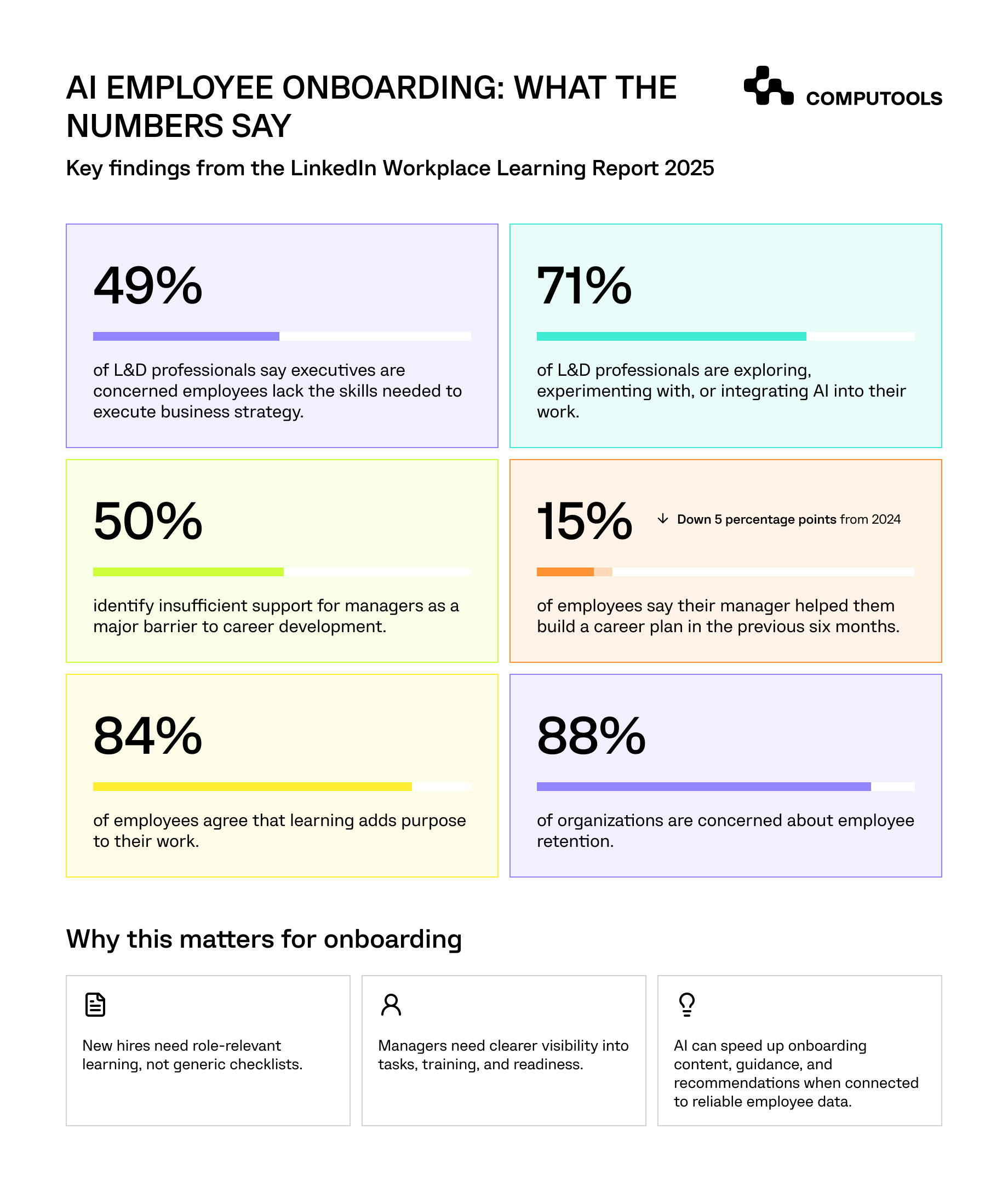
According to LinkedIn’s 2025 Workplace Learning Report, 49% of learning and talent development professionals said their executives were concerned that employees don’t have the skills to execute business strategy. So, how can employers ensure their newly hired employees become productive and acquire the skills and knowledge needed for their role?
Rapid changes in HR demands lead to faster adoption of AI. Yet, adding this technology to disconnected processes will hardly resolve missing approvals, inconsistent employee records, and delayed account provisioning.
A more impactful approach integrates reliable workflow automation with AI to enable knowledge and learning access. Suppose an employee’s HR record has been approved. The algorithms can recommend additional learning and tips based on the role and skills, and initiate the provisioning of the employee’s accounts and mandatory training. An AI assistant can provide company policies and procedures in response to an employee’s request, lessening the burden on HR and experienced employees.
The goal is to shorten the time it takes for employees to enter the workforce and start contributing, as well as enable HR, IT and department managers to follow the same consistent process for onboarding. This article discusses how to accomplish it through connected HR systems, workflows, personalized training, secure AI assistants and measurable employee-readiness criteria.
Why businesses build AI employee onboarding platform software: the Corporate Skillum example
How much time could a company save if new employees received relevant training through the applications they already used, rather than searching through multiple systems?
A relevant example is a US-based B2B SaaS company with ~3,530 employees currently growing at pace in engineering, sales, and corporate functions.
Their learning environment consisted of BambooHR, a legacy learning management system, Slack and Teams, and voluminous internal documentation.
Each system solved a particular challenge, but employees had to switch between systems to access training. The L&D team had similar challenges. Manually updating training modules in line with changing product, process and service offerings was a huge, time-consuming task. Creating a single training module could take up to 80 hours. HR leadership had limited visibility into employees’ existing capabilities and the skills needed for different positions.
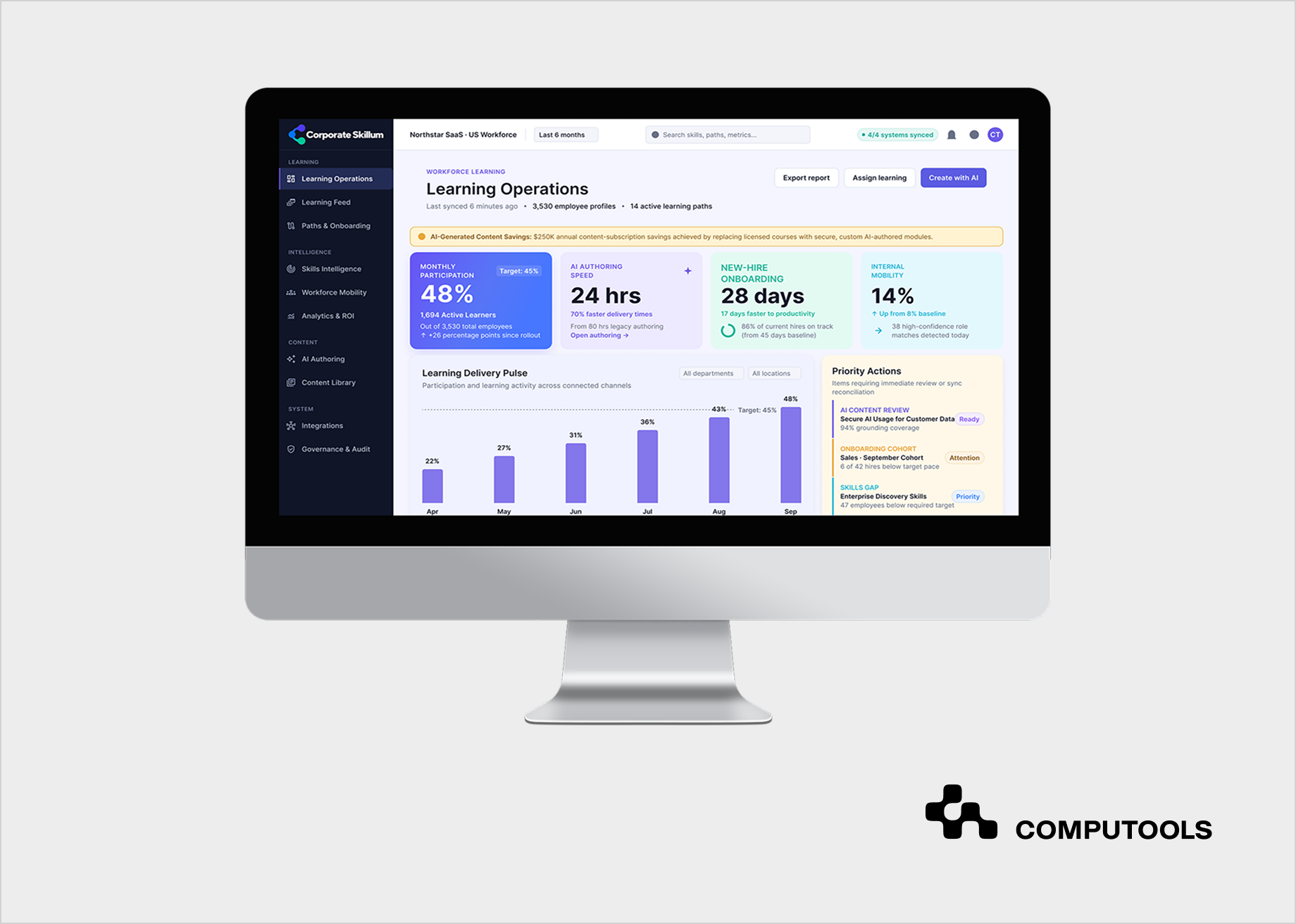
Computools addressed these issues through Corporate Skillum, an AI-powered corporate learning and skills platform.
The solution integrated BambooHR with other systems. Employee records and compliance training stayed in their respective systems and a new system coordinated learning activities and integrations and recommended learning paths.
The architecture had React and TypeScript interfaces, Node.js and NestJS services, Python and FastAPI for AI services, PostgreSQL for structured data, and Pinecone for relevant information.
Learning activities were available via Slack and Microsoft Teams. AI-based content generation reduced the effort to create training content. L&D specialists reviewed and published the content.
The client reported the following results:
| Business indicator | Before | After |
| New-hire time-to-productivity | 45 days | 28 days |
| Monthly active learners | 22% | 48% |
| Course authoring time | 80 hours | 24 hours |
| Internal mobility among active users | 8% | 14% |
The client also reported approximately $250,000 in annual savings after canceling redundant learning-content subscriptions.
How to build an AI employee onboarding platform in 8 steps
The main challenge is integrating various processes across departments that are governed by different regulations and use different systems to store data.
The foundation for AI to improve learning and access to information is in place, but secure employee records and clear workflow ownership are needed, along with controlled system integrations to make further progress.
Step 1. Define the onboarding lifecycle and identify operational delays
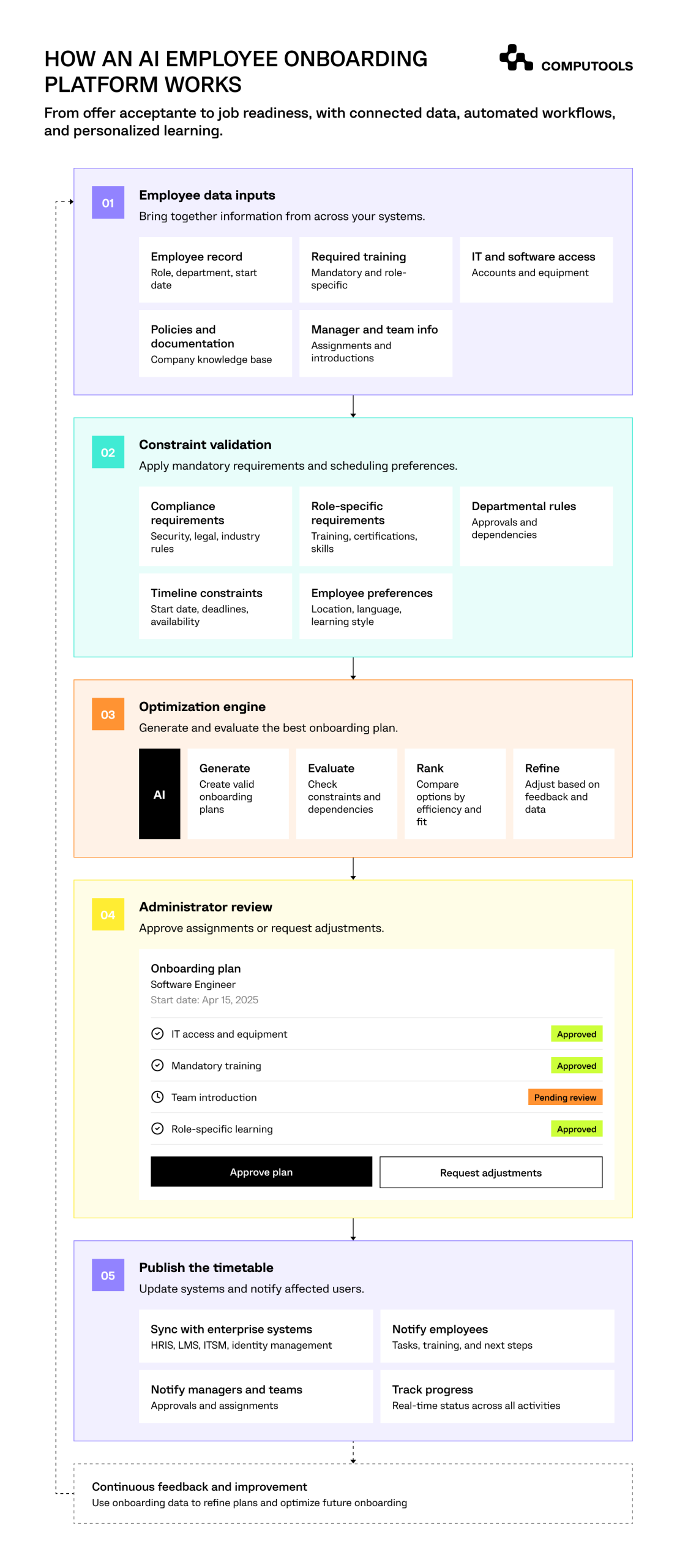
To integrate AI in employee onboarding, organizations need to understand the employee journey from offer acceptance to the time the employee is fully ready to perform the job.
This generally involves multiple functions of the organization, including HR, IT, Finance, L&D, and others.
There are challenges and exceptions in the fulfillment of access requests and training. HR may consider onboarding complete by collecting the employee’s documents. However, IT may not have granted the access request, and the employee is also not trained to perform the job.
The system should allow integration of different tasks involved in the employee onboarding process and should set rules to complete a task before moving on to the next task.
| Stage | Activities | Responsible teams |
| Preboarding | Documents, equipment, account requests | HR, IT, payroll |
| First day | Orientation, access verification, introductions | HR, IT, manager |
| First week | Mandatory training, initial assignments | L&D, manager |
| First month | Role-specific learning, assessments | L&D, team lead |
| Days 30–90 | Performance reviews, skills assessment | Manager, HR |
Automated employee onboarding relies on an understanding of dependencies.
Training, for example, may require the employee to have an active account in the CRM. Therefore, if account provisioning fails, the onboarding system should not consider CRM training to be past due.
The best way to approach this is to determine the most time-consuming aspects of an employee onboarding process, for example, account provisioning, acquiring required documents, obtaining approvals, etc.
This information helps developers understand what the automation goal should be and what should be prioritized.
Step 2. Design the employee data model and integrate existing HR systems
An onboarding system must retrieve relevant information about employees, including their role, department, manager, joining date and location, and employment status. It must also capture information about training that they are required to undertake. The information is retained in a human resource information system.
A key architectural decision in the design of an employee onboarding system is to identify the applications that will continue to own various pieces of information.
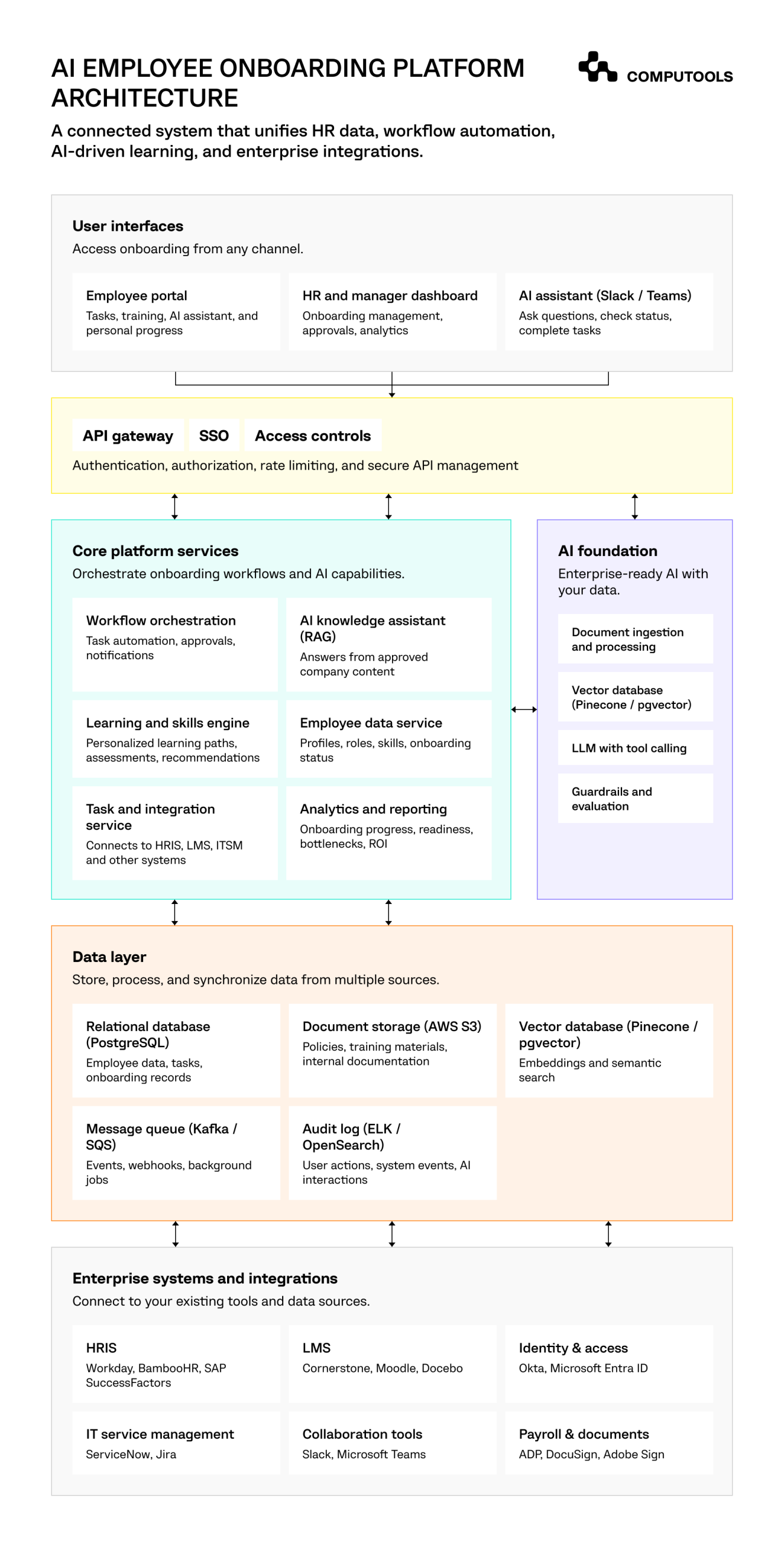
To build an AI employee onboarding platform, a practical architecture can separate responsibilities as follows:
| System | Main responsibility |
| HRIS | Employee records, roles, departments, employment status |
| LMS | Training assignments, course completion, compliance history |
| Identity management | Authentication, accounts, access permissions |
| IT service management | Equipment and software provisioning requests |
| Onboarding platform | Task coordination, learning recommendations, progress tracking |
| Analytics layer | Onboarding performance, delays, employee readiness |
Included among targets for integration are Workday, BambooHR, SAP SuccessFactors, Microsoft Entra ID, Okta, ServiceNow, Jira Service Management, Slack, Teams, and more.
Events can be synchronized via REST APIs and webhooks. Background jobs are used for system updates when notifications are not available immediately.
Of particular concern is the consistency of the data.
For example, if an employee changes departments a few days before the start date and the system captures that change, it should also alter the training requirements and software requests, as well as the employee’s manager.
Without reliable data synchronization, the employee may have access to training they no longer need or systems they should not have access to.
In our project, Corporate Skillum, the team followed this principle by keeping BambooHR responsible for workforce records and the existing LMS responsible for formal training history.
The onboarding platform should coordinate information across these applications without creating conflicting employee profiles.
For organizations managing fragmented learning data, Computools’ article on the role of Big Data in education explains how structured data supports learning analytics and more relevant training decisions.
Step 3. Build a workflow engine for HR, IT, and manager tasks
A new employee’s start date should trigger a coordinated process rather than a series of emails between departments. This is where onboarding workflow automation provides measurable operational value.
Consider a sales manager joining an international company. Once HR approves the employment record, the platform can create requests for a laptop, corporate email, CRM access, mandatory security training, product certification, and introductory meetings.
Each activity follows specific business rules. For instance, a software access request may require manager approval. A compliance course may be mandatory for every employee. Equipment delivery may depend on the employee’s location.
The workflow engine should process these requirements in a defined sequence: Employee event → Rule validation → Task assignment → Approval → Execution → Status update.
Long-running or delayed processes, as well as integration failures, can be controlled by systems such as Temporal, Camunda, and related technologies.
The application should allow for retries and prevent duplication of effort.
The system should be able to learn from previous events. For instance, if an IT API stops responding after an account provisioning request, it must assess if the account was created and only then take the request as a synchronization action.
Exception handling is required to complete new hire onboarding automation. Failed requests should be assigned to a specific owner and/or team for resolution. The logic should include requirements for unblocking. If one is not resolved within a specific time period, it should be automatically escalated to a more senior person.
A configurable HR workflow automation layer allows administrators to adjust approval chains, deadlines, and onboarding templates as company policies change.
AI should also be integrated to recommend additional requests and/or assist in the generation of documents.
Step 4. Create an AI knowledge base using approved company information
New employees ask dozens of questions during their first weeks. Where can they find the travel policy? How do they request software access? Which procedure applies to customer complaints? Who approves a purchase?
A traditional onboarding portal might keep these responses in various files. Employees know where to look to find these files, but it can still be burdensome.
An AI assistant will allow employees to access the information by asking questions.The best approach for this component would be Retrieval-Augmented Generation. Instead of just using the language model to generate an answer using its general knowledge, the platform will retrieve answers from approved company documents and use that information to generate the final response.
For employee training and knowledge management, the application can draw information from business procedures and policies, product and service manuals, training resources, and other company Standard Operating Procedures (SOPs).
PostgreSQL can be used to store and manage training records and other employee training resources.
Teams that build an AI employee onboarding platform should keep in mind that access to files is as critical as the quality of search results.
For example, an employee should be able to view the file containing the company’s policy on reimbursing travel expenses. The employee shouldn’t be able to view files containing confidential salary information, just because those files are stored in the same document repository as the travel expense policy.
The retrieval layer has to filter the employee’s access permissions before showing documents to the language model.
Files should also be versioned. Older versions should not be shown to an employee if the file has been updated and they have no permission for that.
Corporate Skillum used Pinecone to retrieve information from approved corporate materials during AI-assisted course creation. L&D specialists reviewed generated content before publication.
The same approach can support an onboarding assistant that cites its sources and routes uncertain questions to HR rather than supplying potentially incorrect instructions.
Step 5. Develop role-based learning paths and skills assessments
Onboarding processes vary by role. A senior engineer will require a different onboarding process from that of a sales representative or customer support specialist.
Many organizations provide the same basic training to all new hires and additional training, which is selected by a manager.
Personalized employee onboarding should be based on role. Different staff members may benefit from different learning paths based on role characteristics, their skills and learning history, and employees’ perceived strengths and competencies.
Let’s say a senior software engineer is joining the cloud infrastructure team and has prior knowledge of containerization and deployment pipelines.
An engineer, for example, may have a working knowledge of containerization and deployment pipelines. They may not, however, be familiar with the company’s architecture and policies, as well as how release and security checks are performed and code is reviewed.
The training should identify the employee’s prior knowledge, if any, to tailor recommendations and/or training accordingly.
A practical learning recommendation model can combine three inputs:
Role requirements + Existing capabilities + Assessment results
Mandatory compliance courses should remain fixed. Optional learning activities can change based on assessment performance and identified knowledge gaps.
The platform might recommend a shorter technical orientation for an experienced engineer while assigning additional introductory modules to a junior employee.
Managers should be able to review these recommendations, adjust requirements, and confirm when the employee has demonstrated the necessary skills.
The 2025 LinkedIn Workplace Learning Report found that 71% of surveyed L&D professionals were exploring, experimenting with, or integrating AI into their work.
AI recommendations are most useful when they connect to defined business skills rather than simply generating more training content.
For a related perspective on adaptive learning, see Computools’ article on AI in Higher Education: Applications, Personalization, and Benefits.
Step 6. Integrate an AI assistant into employees’ daily work
An AI onboarding assistant loses much of its value if employees must constantly open another application to use it. There are already Slack, Teams, and internal portals for communication and work at most companies.
Adding AI onboarding software for employees to these channels can lessen the effort needed to locate necessary information and training.
Consider a new customer support employee who asks:
“I completed the security course. Why can’t I access the customer service platform?”
The assistant should retrieve the employee’s onboarding status, identify whether a required approval or provisioning request is pending, and explain the next step.
This can be implemented with the use of an LLM, API connectors, and/or authentication tokens. The assistant needs to interpret the user’s request and provide an explanation to the user based on the interpretation and the user’s context. This can be based on the system’s actual status. The assistant should have sufficient controls and approvals to answer the user’s request.
The assistant should not be allowed to approve or deny system access.
Corporate Skillum followed a related approach. The system delivers role-relevant learning activities through Slack and Microsoft Teams rather than relying exclusively on a separate LMS interface.
The same technical principles apply when onboarding assistants interact with HR and IT systems.
Step 7. Develop manager dashboards and employee readiness analytics
Just because an employee has completed their onboarding checklist doesn’t mean they are able to perform their job. Therefore, a way to distinguish between system completion and employee readiness is necessary.
The HR staff should be able to evaluate employee documentation, exceptions and cases. Managers need to be able to analyze and take action on employee training, development and performance.
Some examples of what could be displayed on a manager dashboard include onboarding activities, learning and development, performance, and other data that helps determine if an employee is “job ready”.
The system needs to help determine delays and use historical data to forecast. Understanding historical data on hiring and onboarding can help the organization foresee workforce demand and prepare for business growth and integrations.
Step 8. Secure the platform, test AI accuracy, and launch in phases
Employee onboarding systems collect and store sensitive information, like employment details, departments, permissions, and company documents.
For these systems, security controls should account for traditional application functions and AI features.
With regard to authentication, the application may use SAML 2.0 or the OpenID Connect protocol. User account provisioning and termination may be controlled through SCIM.
Role-based controls may limit the ability of employees to view personal data, approve cases and change the training and upskilling status.
Other controls such as encryption and audit trails, as well as managing the retention of data in the system in line with privacy requirements, may also be implemented.
AI components may be tested to determine its compliance with the company’s policies and other documentation. The team should determine the rate of compliance with the company’s permissions and restrictions and the adequacy of its responses to the questions. The permissiveness of the application to the kinds of questions it receives should also be assessed. Consider exceptions that may be encountered in practice and evaluate the application’s ability to handle them.
A phased rollout reduces the risk of introducing problems across the entire organization.
Start with one or two departments, validate integrations and workflows, and assess whether employees can complete their onboarding activities without additional manual support.
Corporate Skillum used Sales and Engineering pilot groups before expanding across the wider organization.
This approach allowed the team to refine learning activities, AI prompts, integration behavior, and employee interactions based on actual usage.

Launch an AI-powered employee onboarding platform within 1–3 months to automate repetitive HR workflows, cut onboarding costs, accelerate time to productivity, and standardize the employee experience across teams and locations.
How to measure the ROI of AI employee onboarding
The value of onboarding automation should be measured through business outcomes. Companies should establish baseline performance before development and compare results after implementation.
| KPI | What to measure |
| Time-to-productivity | Days until employees meet role-specific readiness criteria. |
| HR administrative workload | Hours spent coordinating onboarding per employee. |
| IT provisioning time | Time required to deliver approved accounts and equipment. |
| Training content production | Hours needed to create and update learning materials. |
| Task completion rate | Percentage of onboarding activities completed on time. |
| Learning participation | Active use of relevant training activities. |
| AI assistant accuracy | Correct answers based on approved sources. |
| Onboarding cost per hire | HR, IT, L&D, platform, and support expenses. |
It should also assess training quality and readiness. A shorter onboarding process has limited value if employees still lack essential skills.
Why choose Computools for AI employee onboarding platform development?
Hiring 100 employees creates hundreds of activities involving HR, IT, managers, and learning teams. The difficulty is making sure every new hire receives the right information, training, and system access.
Computools helps companies reduce that coordination effort and shorten the time between an employee’s start date and their ability to contribute.
Its approach begins with the processes behind onboarding. Which tasks repeatedly require manual follow-ups? Where do access requests get delayed? How much time does L&D spend recreating training materials? Can managers identify employees who need additional support before onboarding deadlines pass?
These findings guide the platform’s architecture and automation priorities.
The company’s education software development services and eLearning software development, are useful to connect training content, learning records, and competency requirements with existing employee systems.
The EdTech software development experience supports adaptive learning and skills-based platforms. Web development services cover employee portals and practical HR management interfaces.
Behind these interfaces, data engineering connects HRIS, LMS, identity, and collaboration systems. AI development adds retrieval-based knowledge assistants, content generation, learning recommendations, and workforce analytics.
The important distinction is how these capabilities work together. An employee’s role determines their mandatory training. Approved company content supports AI-generated learning. Completion records return to the existing LMS. Managers can review progress without collecting updates from several departments.
This approach allows organizations to improve onboarding while retaining the HR and learning systems they already depend on.
For businesses hiring across multiple teams or locations, the expected benefits include fewer manual follow-ups, faster access to relevant training, more consistent onboarding requirements, and clearer visibility into employee readiness.
Get new employees ready for work sooner
A company can complete every onboarding form and still leave new employees waiting for the information, training, or access they need.
Many of these delays can be eliminated with the integration and automation of workflows between HR, IT, and learning. Some of the delays can be eliminated with the help of AI.
One good example is the Corporate Skillum project, which integrated the employee directory, learning management content and systems, and AI-based training. Because of the integration, the average time to productivity of a new hire was reduced by 50%, to 28 days.
Are you still taking weeks to get new employees up to speed? Computools helps accelerate employee onboarding by integrating and automating workflows across HR, IT and Learning systems.
Computools
Software Solutions
Computools is an IT consulting and software development company that delivers innovative solutions to help businesses unlock tomorrow.