
THE AUTHOR:

If you plan to build a city events platform, you are joining a market characterized by quickly developing digital discovery and experience-driven travel. Market research suggests that hyperlocal event and experience solutions will surpass $8 billion by 2032. This growth will stem from the demand for real-time, context-specific suggestions and mobile interactions.
Travel patterns are changing, with people moving away from the traditional sightseeing toward curated, meaningful experiences. A trend report from Tripadvisor indicates this shift for 2026, as more people take trips focused on local events and cultural activities that add purpose to their journeys.
Mobile event apps remain on an upward trajectory. As users become more mobile and instant, so do event applications. Users expect to find discovery and booking tools within one system.
Personalization, social interaction, and on-site engagement are the main trends seen in modern events. This means that platforms must go beyond merely providing lists and instead offer event-goers customized interactive experiences.
To build a city events platform for today’s needs, include location-dependent services, a mobile-first interface, real-time engagement, and personalized content. Solutions that integrate these features will demonstrate real value to their users, event hosters, and the community.
For guidance on building modern urban tourism platforms, see how to develop a smart tourism platform for urban destinations.
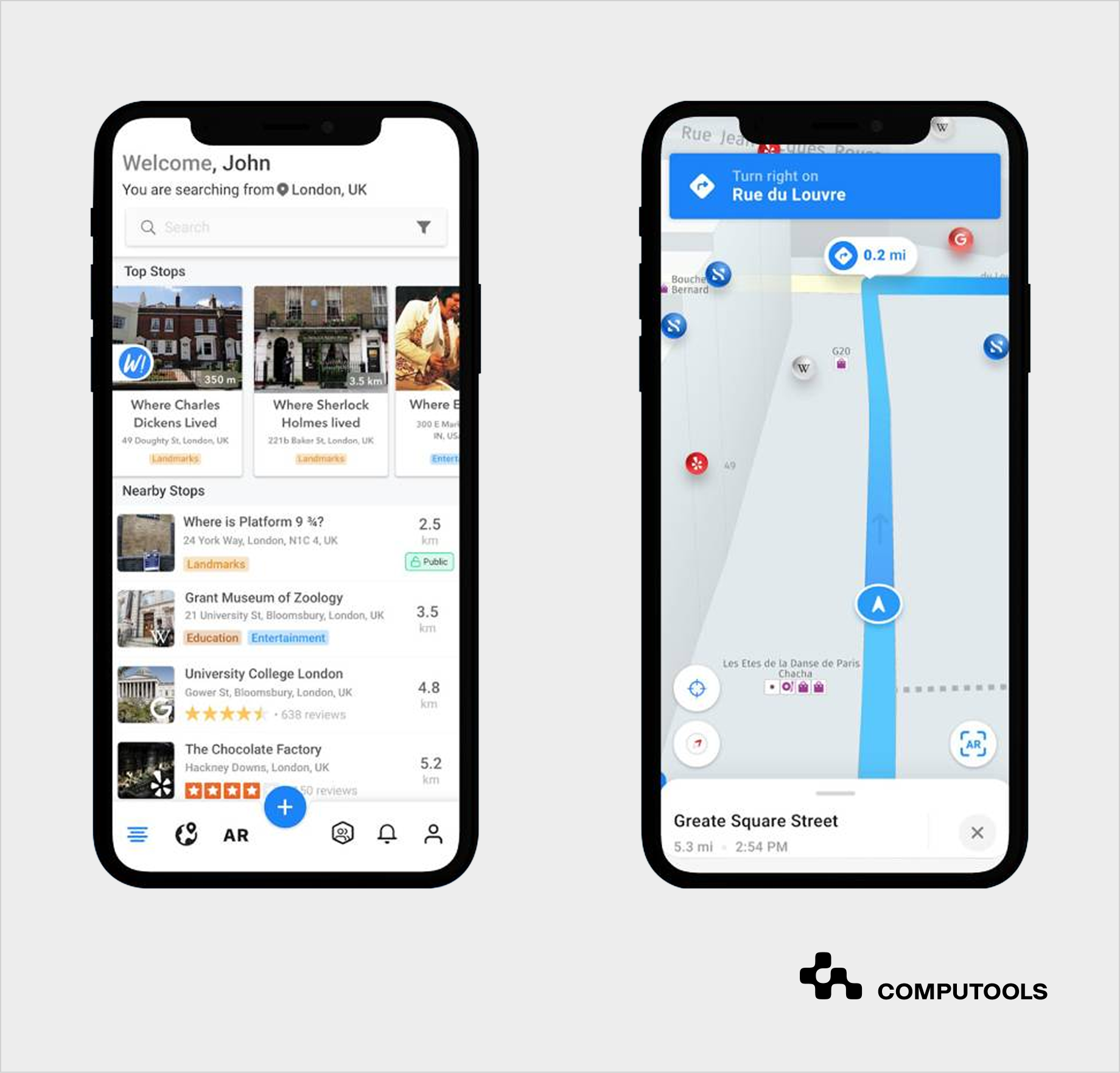
Spotlight on the SMARTCITY project
SMARTCITY is an excellent example of how Computools creates platforms that focus on the urban context and interaction layers of discovery, engagement, and real-time collaboration.
About the Project
Computools has developed a social networking application for tourists that helps with the geolocation of tourist destinations, events, and businesses currently surrounding the user, and also allows for communication between users (tourists).
Accessible through the app is a fully integrated set of geospatial functions, augmented reality, instant messaging, and a 3D navigational guide.
Key Features
- Geospatial search to discover attractions, events, and points of interest in real time based on location.
- Augmented reality allows users to see digital information overlaid on the real world, including nearby landmarks and event information.
- Instant messaging was implemented via private and group chats to facilitate communication and planning.
- Interactive media features give the opportunity to add and tag photos, and link them to various locations and contextual information.
- 3D navigation serves as a virtual guide through a city.
Technical Implementation
- Mobile stack – Android SDK, Java, Retrofit 2, RxJava, and ButterKnife to develop modular and maintainable mobile code.
- Architecture – end-to-end platform architecture optimized for real-time feeds and reliable performance for multiple simultaneous users.
- Agile development – use of Scrum promoted transparency and iterative development, fostering collaboration and understanding of progress.
Outcomes and Impact
The solution successfully engages both international and domestic users, driving tourism and supporting local businesses.
Step-by-step guide to building an urban event discovery platform
See what it takes to create a high-performing city events platform with geolocation, smart recommendations, and integrated ticketing.
Step 1: Define the Platform Model and Discovery Experience
First of all, establish the main focus of the urban event discovery platform, since this determines the architecture, needed integrations and how data will move within it.
Urban applications can be built around the following aspects:
- Tourism and city exploration, which entails geospatial indexing, itinerary planning, and hospitality APIs.
- Nightlife and entertainment systems focus on managing real-time availability and event updates, low latencies, and high-concurrency ticketing.
- Community or local event solutions require moderated content, user-organized events, and social activity feeds.
SMARTCITY demonstrated the importance of defining both user and business goals upfront. The platform combined tourist discovery, social engagement, and local business promotion, showing that mapping user journeys and interaction flows early helps align features with real-world needs. At this point, define the core system behaviors as follows:
- Event discovery logic – the rules of filtering, ranking and recommending, geolocation, event categorization, and user role context.
- Data aggregation – normalization and consistency standards for APIs, event streams, and outside services.
- Mobile-first interactions and how they manifest for map and route real-time rendering and offline mode.
- Real-time constraints – system capacity and expected load for event availability.
These choices drive microservices, AI recommendations, real-time inventory, and integrations to satisfy user experience and operational requirements.
Step 2: Build the Frontend Layer for Mobile and Web
A good frontend achieves a balance of real-time interactivity, performance, and ease of use.
- Platforms and Frameworks
Choose between creating a native mobile application (iOS/Android) and using frameworks that support cross-platform development (e.g., React Native, Flutter). For city event applications, native mobile options may offer better performance for offline caching, map rendering, and device-level notifications. The web application should be responsive and allow users to create a similar experience to a desktop by dynamically loading and filtering live content.
- Event Discovery Interfaces
There are various event discovery features that users expect to discover events with ease.
- Search and filters
The ability to search/filter for date, category, location, popularity, and price. Implement a faceted search that responds instantly to user input.
- Personalized recommendations
Events suggestions based on location, recent profile activities, or trending popularity. Utilize API calls that are quick to provide recommendations without impacting the overall user experience.
- Map-based discovery
An interactive event discovery experience featuring event clusters, venues, and recommended routes. Panning/zooming should remain responsive, even with events distributed over hundreds of locations.
Real-Time Updates
Users expect accurate availability and event details. Here’s how to meet these requirements:
- Live availability
Seat counts, ticket statuses, and waitlists should be displayed in real-time. Use WebSockets or streaming APIs for updates.
- Alerts & notifications
Event reminders or other relevant last-minute updates should be push notifications. Be careful to avoid putting multiple or irrelevant alerts to users.
- Dynamic content
Event lists or images and other user content should be dynamically loaded to visitors as they scroll.
Interactive Maps and Geolocation
Maps are crucial in event discovery app development. Make sure the solution provides:
- Geospatial awareness
Show the nearest events and give real-time updates of distance and estimated travel times.
- Routing and directions
Integrate with mapping services (Google Maps, Mapbox) to display walking, driving, or public transport routes.
- Venue clustering and heatmaps
Reduce visual clutter by dynamically grouping events and showing the trending areas.
- Offline support
Cache map tiles, so that users can browse event data in areas with poor connectivity
Performance and UX Considerations
Optimize your image assets, media galleries, and map markers to keep loading times and processing times under control. Use virtualized lists for long event feeds to keep your UI design and processing times under control. Ensure smooth scrolling, minimal frame drops, and fast interactions during map manipulation. Prioritize critical flows (search, map navigation, checkout) and prefetch less-critical assets in the background.
When real-time updates and fast and responsive UI features are implemented, the platform goes beyond the mere presentation of events. It retains, engages, and converts users, ensuring a solid process from discovery to attendance.
Step 3: Build the Core Backend Services
The backend manages all the critical operations that power the urban event discovery platform, and makes sure that the frontend gets the data accurately and on time.
- User Management
Handles authentication, profiles, preferences, and access rights.
For secure login and social sign-in via Google and Apple, build authentication using OAuth 2.0 or OpenID Connect. For user, organizer, and admin functions, employ JWT-based authentication and role-based access control. For personalization and recommendation capabilities in the future, user preferences should be stored separately.
- Event Catalog Service
Stores event metadata, schedules, venues, categories, and organizer data.
PostgreSQL, combined with PostGIS, should be utilized to manage structured event and geolocation data. Since event discovery generates significantly higher traffic than publishing, you should optimize the catalog for fast read. For frequently requested listings, employ Redis for caching. Use cloud object storage, such as S3, for event media assets.
- Search and Filtering Services
Supports location-based search, filtering, and sorting.
In order to encompass fast filtering, full text search, and geospatial queries, utilize either Elasticsearch or OpenSearch. Keep search indexes and transactional databases separate, so as not to slow down the platform. Make index updates on the newly added or changed events asynchronously.
- Booking and Payment Systems
Manages reservations, availability, checkout, and payment validation.
Use databases like PostgreSQL to keep transactions accurate and avoid double bookings. During the checkout progression, temporarily lock the seat with Redis TTL to control the session. Implement payment gateways like Stripe and PayPal, as well as webhooks, to handle payment confirmation, status posting, and retries.
- Notification Services
Handle alerts, reminders, and event or booking updates with minimal burden on the system.
Modular design for notification systems offers minimal to even no impact on the main application. Firebase Cloud Messaging and APNS should be used for push delivery. Employ SendGrid or Amazon SES for transactional emails. RabbitMQ or Kafka are recommended as queue services to ensure that reminders, alerts and booking updates are sent seamlessly, even in times of peak load.
The platform’s backend is strong when developed with a well-structured, modular approach. It supports multiple frontends, scales at peak loads, and provides the foundation for AI recommendations, integrations, and real-time features added in later steps.
For example, for the SMARTCITY project, a backend able to manage user profiles, location data, event metadata, and social interactions was required. We used modular services, which helped the system to scale while keeping the data consistent across mobile clients. This modular design was able to manage the geospatial search, AR data feeds, and messaging. For urban event platforms, a similarly structured backend ensures reliability and real-time accuracy.
Step 4: Build Geolocation and Mapping Infrastructure
Smart city event discovery solutions heavily rely on maps and location-based functionalities. Users want to see local events as well as create and follow routes, so this layer needs to be effectively integrated. Most importantly, it needs to be quick and accurate.
Map and Location-Based Features
- Event positioning – store venue coordinates and dynamically display events on maps. Use clustering techniques to avoid overcrowding the interface in dense areas.
- Nearby suggestions – calculate proximity in real time to suggest events within a user’s current location or travel radius. .
- Routing and directions – recommend routes to venues, including walking, driving, and taking public transport. Integrate with external APIs like Google Maps or Mapbox.
- Offline support – allow for access to required maps and basic information on events without a current connection by saving map and event data locally.
Technical Considerations
Make use of geospatial databases to speed up the processes related to spatial queries, filtering, and proximity calculations. Take advantage of dynamic indexing to allow for frequent calendar adjustments and new additions or cancellations of events.
Optimize map rendering with lightweight assets and incremental loading to maintain smooth performance on mobile devices. Minimize server burden by caching frequently used routes and clusters. Decouple event data requests from map rendering for efficient concurrent updates. Anticipate and manage API requests to mitigate user congestion and avoid slowdown when users request proximity or event recommendations.
This strategy guarantees that the operation of the platform’s map and event discovery capabilities is accurate and doesn’t overload the system while keeping the maps up to date, fast, and functional.
Step 5. Integrate Real-Time Infrastructure and Availability Management
This layer ensures all users have the most up-to-date information and can confidently make a purchase.
Key aspects:
- Live availability – monitor and update users on the status of tickets and seats, and the capacity of events.
- Event synchronization – implement updates from the event organizers, third-party sources, or integrated platforms into the system.
- Queue management – manage user demand during popular event releases. Gradually admit users to maintain performance and avoid system overload.
- Streaming architecture – implement WebSockets or server-sent events to deliver real-time updates.
Technical Considerations
Using atomic transactions for seat locking and adding a time-based hold with a time-to-live value (TTL) would eliminate double bookings. Design message queues that can handle a wide range of computational scalability, so that the frontend and backend can work with multiple streams of data simultaneously. Keep services that provide high-frequency real-time communications separate from standard CRUD operations.
Performance Strategies
- Cache non-critical data locally in the frontend to reduce server requests while keeping key availability and booking data live.
- Use lightweight payloads and batched updates for notifications and status changes.
- Monitor system load and dynamically scale real-time services to handle peak traffic periods.
This step establishes the platform’s ability to maintain accurate, timely information under heavy load, providing users with confidence in bookings and a smooth discovery experience.
Step 6: Integrate Ticketing, Payments, and Reservations
Smooth booking is at the heart of any local events platform software. Users want to find out about events and finalize their purchases without exiting the app. On the other hand, event organizers need reliable sales tracking and safe payment management.
Management of Ticketing and Reservations
Show current seat positions. Temporarily hold seats during the buying process, and instantly adjust available seats across all platforms. Users should be able to be on the waitlist for fully booked events as well as transfer and refund tickets.
Payment Processing
Add and support payment options from Stripe, PayPal, Apple Pay, Google Pay, and ‘Buy Now Pay Later’. Make payment data collection safe and rely on the highest international payment cybersecurity standards to be PCI DSS compliant. Failed or not, payment systems should be able to inform users of the status of their payment. Also, allow for error handling for failed or declined payments.
External Service Integration
Integrate ticketing APIs, event feeds, and partner platforms to streamline availability and bookings. For tourism or nightlife services, combine hotel, restaurant, and transportation services for packaged offerings.
Allow organizers to conduct event and ticket management through dashboards integrated directly with the backend of the platform.
Performance Factors
Optimize for low latency during peak offerings, including flash sales and festival demand spikes. Cache static data, and keep dynamic data current for ticketing, booking, and reservation transactions.
Vigilantly watch the successful transaction rate and put retry logic for the operations that don’t succeed.
For more details, check Computools’ guide on restaurant reservations, which illustrates how to implement scalable booking and real-time updates.
Step 7: Design AI-Powered Recommendations and Personalization
AI and machine learning applications have a very high value in city events platform development when it comes to building valuable experiences and personalizing user journeys. For instance, SMARTCITY used geolocation, historical interactions, and social signals to suggest attractions, nearby events, and user-relevant AR content.
Develop Context-Aware Recommendation Logic
Recommendation systems should weigh multiple signals, rather than concentrate on one broad action like user past behavior.
Factors of this kind are user preferences, activities, events and categories that users have saved and/or purchased, recent movements within a specified time, location, time of day, and day of week, new activity being introduced, city-wide popularity and demand fluctuations, social engagement, and ticketing trends, etc.
This requires the ranking systems to consider:
- user preference scoring
- geospatial relevance
- temporal relevance
- real-time popularity signals
- availability of the event.
The recommendation system should continuously rebalance results as events change in popularity or as tickets are sold/released.
Improve Search Beyond Keywords
Search should prioritize intent over keyword matching. Most users tend to search more conversationally. For instance,“live music near me tonight,” “things to do this weekend,” “family events nearby.”
Semantic search models aid in interpreting user intention, factoring in location, context, prioritizing time, relevancy, and live availability.
Use Predictive Analytics for Operational Decisions
AI can also improve operational efficiency. Predictive AI models help forecast attendance, identify booking peaks, and detect trending areas across the city. These insights support infrastructure planning, notification timing, and promotional campaigns.
In order to support the above, most platforms have a separate layer of analytics, which processes event info, user activity, user map activity, and user purchasing behavior, all behind the scenes and without affecting transactional systems.
Step 8: Add Social, Marketing, and Engagement Integrations
In addition to the discovery and booking, an event listing platform for citiesrelies on external channels for user acquisition, retention, and engagement. The internal instant messenger and group collaboration tools in SMARTCITY highlight the value of social integration. Users could share locations, photos, and event info within groups, enhancing engagement. Urban event platforms can replicate this with social feeds, sharing, notifications, and community features to keep users returning.
Social Media Integrations
Implement content sharing. Make sure users can promote events, saved items, or itineraries on Instagram, TikTok, Facebook, etc. Employ feed synchronization. Add social content such as trending posts or event hashtags to the app’s interface to promote contextual discoveries. To see more engagement with events, enable user-generated content like community likes, comments, and reviews.
Marketing and Retention Tools
Add CRM integration for user segmentation, loyalty programs, and targeted promotions. Don’t forget about push notifications and email campaigns, and analytics tracking for engagement rate, notification conversion, and campaign optimization. As an example, SMARTCITY’s team used analytics on user movement, interactions, and AR engagement to optimize features post-launch.
Technical Considerations
Employ secure API connections to accommodate anticipated traffic and protect sensitive information. Make tactical use of background jobs to send notifications to participants without disrupting core processes. Optimize social sharing to avoid interruptions in map rendering or discovery flows.
Step 9: Prepare for Scalability and High Urban Traffic
City event guide app development should consider changing traffic, especially when dealing with high-demand concerts, festivals, and ticket flash sales. The outcome at this level is all about ensuring the system performs well even during visit spikes.
Scaling Infrastructure
Design the system for horizontal scaling. It should be able to add more servers or microservices to accommodate an increasing number of users without affecting performance. Load-balance to reduce bottlenecks. Distribute the incoming requests to each of the servers. Use a CDN. Static resources (images, maps, and media) should be cached to reduce access times.
Database and Caching Frameworks
- Separate the read and write operations to ensure the system operates optimally at all times.
- In-memory cache should be used to store frequently used data.
- Optimize the geospatial queries to enable real-time filtering and calculations of proximity.
Traffic Management
To reduce the risk of server overload, create purchase queues for tickets. Monitor and adjust resource distribution to changing peak concurrent users. Collect system performance stats to find slow points and optimize response time.
Mobile Performance
Download critical information in advance, like events and map tiles, in order to maintain a seamless experience. Avoid app freezes during high user interaction with lazy loading and incremental updates. Design API calls to minimize latency and provide real-time updates.
This step is crucial for high-traffic events to keep the platform performing well, protecting user experience, inventory accuracy, and ensuring the highest conversion rates.

Want to launch your urban event discovery platform in 1–3 months instead of spending years stuck in development? Contact our team and get a clear roadmap, timeline, and delivery estimate.
Why clients choose Computools to build a city events platform
Custom event discovery software combines several demanding systems at once: geolocation, booking, payments, mobile UX, real-time updates, and high levels of user activity. Computools works with companies to develop scalable systems that are always fast and stable.
1. Faster discovery to booking
Users leave if they think search, map, or checkout is slow. We have experience optimizing digital booking journeys in travel, hospitality, and transactional platforms.
In WorldTicket, our team improved an airline booking web portal, which led to a sales increase of 26%. We created a dynamic search, enhanced the existing user interface, and integrated the client’s PSS systems.
This experience is highly relevant for:
- event search and filter
- ticket booking flows
- mobile checkout
- real-time availability.
For comparison with other industry providers, see the best travel booking platform development companies.
2. Support Location-Aware Urban Experiences
Location is an important part of an event management platform for cities. Users expect reliable geo data, accurate routing, and suggestions of activities or events nearby.
In the LOCARGO project, Computools developed web and mobile applications for the client’s logistics marketplace. We integrated Google Maps, added GPS monitoring, and developed route optimization logic. The platform helped the client increase revenue fivefold over two years.
This experience can be used in developing map-based solutions for:
- event browsing
- venue discovery
- route planning
- nearby event suggestions
- geo-based city data.
3. Design Around Clear User Journeys
Urban platforms get cluttered with tools like filters, maps, and partner content. Computools’ British Council project exemplifies how to simplify user journeys using a combination of CX strategy, along with UX and UI enhancements, portal development, hosting, and analytics. The outcome was improved responsiveness and engagement, resulting in a rapid increase in registered users.
This strategy helps urban event platforms to:
- minimize discovery friction
- improve management of content libraries
- steer users towards making bookings
- increase engagement with better navigation.
4. Secure Payments, Accounts, and Sensitive User Data
When it comes to protecting user accounts, saved cards, loyalty features, and partner dashboards, event marketplace platform development is especially concerned.
Within the Moblet initiative, Computools created mobile and web banking capabilities with SWIFT, Visa, and MasterCard integrations. We also implemented KYC onboarding, fingerprint and two-factor authentication, and the continuous security and monitoring of transactions in real-time.
This experience provides support for:
- Secure payment systems.
- Protection for user accounts.
- Role-based access for content creators and users.
- In-app purchases monitoring.
- Safer mobile onboarding.
5. Experience Across Relevant Domains
Developing a local events aggregator platform overlaps with tourism, nightlife, dining and catering, and local attractions. Computools brings practical experience from travel and hospitality software development services, heritage tourism software development, and software development services for HoReCa, which require real-time availability management, reservation workflows, and multi-system integrations.
Multitrading and Tap App are examples of projects where systems for discovery, engagement, booking, and operations were built with seamless and real-time data exchange.
6. Build the Entire Ecosystem Under One Roof
Computools can build the entire platform value chain:
- mobile app development services and web solutions
- backend systems
- payment gateways
- API layer
- AI development services
- analytics dashboards
- cloud solutions.
It offers minimal gaps in integration, rapid time to market, and a seamless flow from discovery to engagement.
Final thoughts
As you consider a technology partner to build a city events platform, look for real-time discovery, mobile-first design and personalized engagement and booking, and an accurate, robust, and scalable framework. The market continues to grow, and sophisticated users expect experiences to be seamless, contextual, relevant, and timely.
Computools is a recognized leader in the design and development of urban event platforms. Our AI-driven recommendations, geolocation and augmented reality services, along with high-concurrent booking flows, create event-driven services that are designed to be high-stakes and to drive meaningful engagement. Planning to deliver premier user experiences? Reach out to Computools through info@computools.com.
Computools
Software Solutions
Computools is an IT consulting and software development company that delivers innovative solutions to help businesses unlock tomorrow.